
How to Stop Phishing Attacks in Healthcare Email
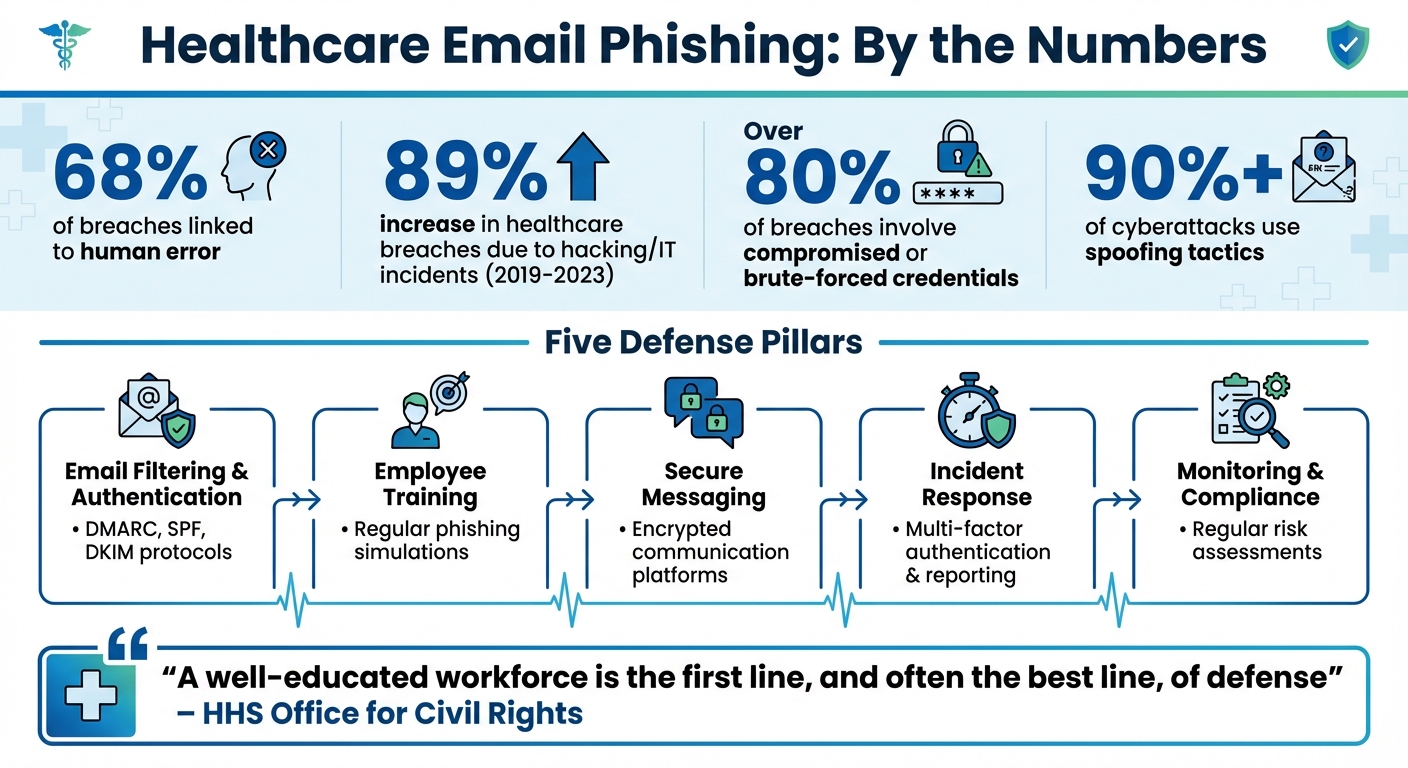
Phishing attacks in healthcare email are a growing concern, with 68% of breaches linked to human error. These attacks exploit staff through deceptive emails, risking patient data, financial losses, and operational disruptions. To combat this, healthcare organizations must combine technical solutions with employee training and compliance measures. Here's how to protect your systems:
- Email Filtering & Authentication: Use spam filters, DMARC, SPF, and DKIM to block malicious emails before they reach inboxes.
- Employee Training: Teach staff to recognize phishing tactics and run regular phishing simulations to reinforce awareness.
- Secure Messaging Tools: Implement encrypted platforms like Eleidon for safe communication.
- Incident Response: Establish clear procedures for detecting and responding to threats, including multi-factor authentication and reporting systems.
- Monitoring & Compliance: Conduct regular risk assessments and stay updated on emerging threats.
Healthcare Email Phishing Statistics and Defense Strategies
Healthcare Cybersecurity Training
sbb-itb-804866a
Set Up Email Filtering and Authentication
Email filtering and authentication protocols act as a frontline defense, stopping phishing emails before they even reach employees' inboxes. By automating the detection of threats through sender verification, content analysis, and domain reputation checks, this system lightens the load on employees, reducing the chances of human error. Below are key configurations to strengthen your email security.
Configure Spam Filters and Threat Detection
Spam filters rely on multiple layers of scanning to catch phishing attempts. Start by enabling sender validity checks - flagging domains that are less than 5 days old - and use pre-delivery scanning in sandbox environments to block harmful attachments and links.
To prevent attackers from hiding malicious websites behind shortened URLs (like bit.ly), configure filters to expand these links and reveal their true destinations. Also, set your scan size to at least 2MB to ensure larger malicious attachments don’t slip through. For added protection, deploy Federated Email Defense (FED) with custom dictionaries that flag executive names and domains resembling your own, helping to stop business email compromise (BEC) attempts.
Layering filters is critical: for example, add headers (such as X-SPF-DKIM=Fail) when authentication fails, and quarantine emails only when multiple red flags are detected. This approach minimizes false positives while maintaining robust security. Additionally, limit allow-listed domains strictly to essential business partners - overly broad permissions can create exploitable vulnerabilities.
Use DMARC, SPF, and DKIM Protocols
SPF (Sender Policy Framework), DKIM (DomainKeys Identified Mail), and DMARC (Domain-based Message Authentication, Reporting & Conformance) are essential tools to ensure emails from your domain are authentic. Here’s how they work together:
- SPF: Authorizes specific IP addresses to send emails on behalf of your domain.
- DKIM: Adds cryptographic signatures to ensure the email’s content hasn’t been tampered with.
- DMARC: Links SPF and DKIM by ensuring the "From" header matches authenticated domains.
To implement these protocols, start with DKIM, followed by SPF, and then DMARC. Initially, set your DMARC policy to p=none to monitor email traffic without blocking legitimate messages. This helps you identify third-party senders, like billing services or patient portals, that may need authentication. As Chris Singlemann from Prelude explains, “A DMARC policy of 'none' provides visibility but no protection - suspicious emails will still be delivered”. Once legitimate sources are verified, transition to p=quarantine (sending unauthorized emails to spam) and eventually to p=reject (blocking them altogether).
For subdomains or parked domains that don’t send emails, publish a "deny all" SPF record (v=spf1 -all) to prevent them from being misused in spoofing attempts. Keep in mind that SPF has a strict limit of 10 DNS lookups - going over this limit can cause authentication failures and disrupt legitimate email delivery. Use DMARC’s rua tag to receive aggregate reports, which provide insights into delivery issues and spoofing attempts targeting your domain.
These protocols act as a foundational shield, complementing the training and incident response strategies covered in later sections.
Train Employees and Run Phishing Simulations
While technical filters play a role in reducing risks, an informed and alert workforce is the final line of defense. Recent statistics reveal a concerning rise in ePHI breaches caused by hacking, with over 80% involving compromised or brute-forced credentials - many of which are obtained through phishing. This underscores the importance of training employees to recognize and report phishing attempts. In fact, the HIPAA Security Rule requires healthcare organizations to implement security awareness and training programs for all workforce members.
Teach Employees to Spot Phishing Emails
Employee training should be engaging and relevant, not just a routine "check-the-box" activity. The OCR warns that ineffective training programs - those relying solely on self-paced slide presentations - can leave organizations vulnerable. Instead, focus on continuous education that evolves with new threats, such as ransomware, whaling (executive-targeted phishing), and AI-generated deepfakes.
Equip employees with the skills to spot phishing red flags. For instance, phishing emails often use urgent or threatening language like "account suspended" or "action required immediately" to trigger hasty decisions. Encourage staff to scrutinize sender details, especially when the display name appears familiar but the email address originates from an unfamiliar domain. Other warning signs include generic greetings (e.g., "Dear Member"), links with mismatched URLs when hovered over, and subtle typos in trusted domains, such as "micros0ft.com."
Don’t limit training to email threats. Educate employees about smishing (phishing via text messages) and vishing (voice phishing). For example, teach them to avoid calling phone numbers provided in suspicious messages. Instead, they should verify requests using official contact information from the organization’s website.
Since executives often have greater access to sensitive ePHI, ensure they actively participate in training. They are prime targets for whaling attacks. Establish clear procedures for reporting suspicious emails, such as forwarding them to a designated IT contact rather than simply deleting them.
Reinforce these lessons with hands-on learning through simulated phishing exercises.
Run Regular Phishing Tests
Testing employees with realistic scenarios is a key part of building awareness. The HHS Office for Civil Rights emphasizes that “sending simulated phishing emails to test workforce member knowledge of how to identify phishing emails is an excellent method of providing security reminders”, which aligns with HIPAA Security Rule requirements.
Design simulations to mimic authentic workplace communications, such as fake HR updates or IT security alerts. This approach helps employees practice identifying threats in the types of messages they encounter daily. Tools like the NIST Phish Scale can be used to assess the difficulty of simulated phishing emails by analyzing factors such as "cue visibility" and their resemblance to regular work tasks. These insights help IT teams understand why certain employees may fall for specific phishing attempts, allowing for targeted follow-up training.
Expand simulations to include physical security tests. For example, leave USB drives in common areas like lobbies or parking lots to test whether employees plug them into work devices. You can also conduct smishing tests by sending simulated text messages with urgent prompts, such as fake password reset requests.
After each simulation, provide immediate feedback. Use these exercises as ongoing "security reminders" to maintain awareness between formal training sessions. Track performance metrics to identify departments or individuals who may need additional support.
When combined with technical safeguards, these proactive training strategies strengthen the overall security of healthcare email systems.
Use Secure External Messaging with Eleidon
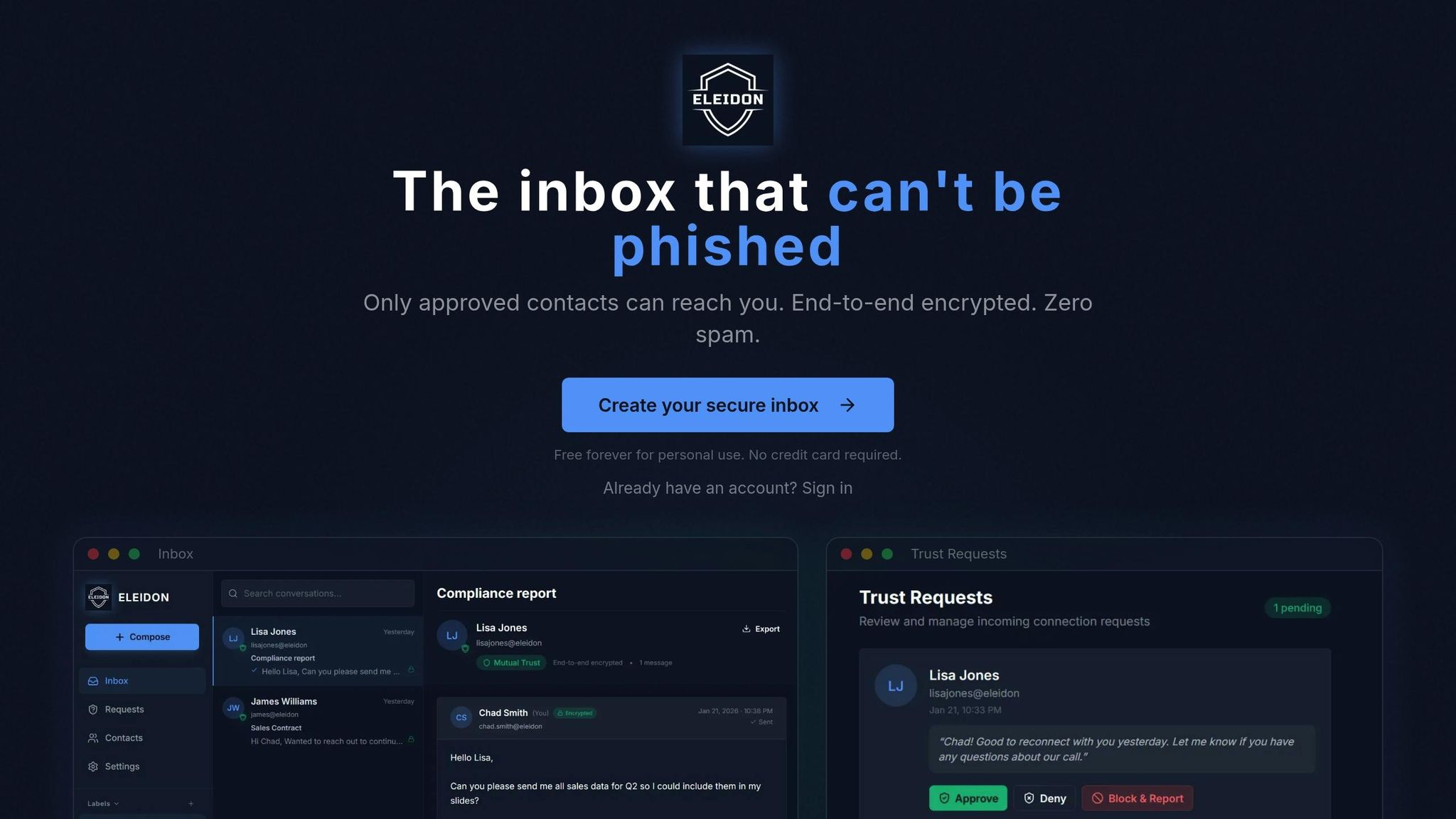
Traditional email systems leave healthcare staff vulnerable to spoofing and social engineering attacks. Even with technical filters and employee training in place, risks persist. Eleidon addresses these challenges head-on by ensuring only verified messages reach your team. Using cryptographic sender verification, Eleidon blocks unsolicited phishing attempts before they can do harm. This technology helps prevent spoofing, which is responsible for over 90% of cyberattacks targeting the healthcare sector. Additionally, Eleidon’s trust request system empowers staff to approve or deny incoming contact requests, adding another layer of protection. Combined with encrypted messaging, this system ensures your communications remain secure.
Use Eleidon's Encrypted Messaging
Eleidon takes the security of Protected Health Information (PHI) seriously with its end-to-end encryption, ensuring data stays protected during transmission. Thanks to its zero-knowledge architecture, even Eleidon itself cannot access your messages. When an external vendor or partner wants to connect with your team, they must first send a trust request. Your staff can verify and approve these requests before communication begins. This setup not only secures sensitive exchanges but also helps your organization stay compliant with HIPAA standards.
Select the Right Eleidon Plan
To meet diverse organizational needs, Eleidon offers flexible plans:
- Personal Plan: Free forever, this plan is perfect for individual practitioners. It includes unlimited encrypted messaging and an @eleidon address.
- Team Plan: For $9 per user per month, this plan adds custom domain support and centralized team management, making it easier for IT administrators to oversee team members.
- Team + Vault Plan: At $14 per user per month, this plan includes encrypted key backup, multi-device sync, and an account recovery guarantee - ideal for maintaining continuity when staff change devices or credentials.
All plans are designed to integrate seamlessly across web, mobile, and desktop platforms. Best of all, there’s no need to modify MX records or disrupt existing email workflows.
Create Incident Response and Reporting Procedures
Even the strongest defenses can sometimes falter. The HIPAA Security Rule mandates that healthcare organizations establish security incident procedures to detect, respond to, and mitigate security incidents effectively. Between 2019 and 2023, healthcare breaches due to hacking or IT incidents reported to the HHS Office for Civil Rights surged by 89%. A well-structured response plan is essential for quickly containing threats and safeguarding patient data. The first step in a strong incident response strategy is securing access, which we’ll explore next.
Implement Multi-Factor Authentication
Multi-factor authentication (MFA) is a key security measure for protecting email accounts. Attackers frequently target personal devices used for secondary authentication. With MFA in place, even if a phishing attack compromises a password, unauthorized access is blocked unless the attacker can bypass the second authentication factor. However, personal devices used for MFA are prime targets and must be secured with care.
Healthcare organizations should enable MFA across all email accounts, administrative systems, and platforms that handle electronic Protected Health Information (ePHI). This step works hand-in-hand with the technical filters and employee training already discussed, adding an extra layer of defense.
Set Up Reporting and Response Procedures
Quick detection and streamlined reporting are vital components of effective incident handling. Create a dedicated incident response mailbox (e.g., "security@yourorganization.com") where employees can immediately forward suspicious emails for review. Additionally, train staff to verify urgent requests by calling a trusted, official number. As the HHS Office for Civil Rights emphasizes: "A well-educated workforce is the first line, and often the best line, of defense to halt a cyber-attack before it starts".
Leverage tools like Microsoft Defender for Endpoint to identify malicious payloads and trace all recipients of a phishing email. Check for unauthorized email forwarding rules, which attackers might set up to redirect patient data to external domains. Also, review mailbox permissions for any unexpected delegated access. To enhance monitoring, enable default mailbox auditing in Exchange Online, which helps track suspicious activities like access from unusual IP addresses or large volumes of deleted messages.
Every incident should be thoroughly documented, and audit logs should be retained well beyond the typical 30–90 day period using a SIEM system like Microsoft Sentinel. This documentation not only ensures HIPAA compliance but also provides critical insights for refining your security measures. These records can directly inform ongoing training and risk assessments, further fortifying your organization’s defenses.
Monitor Systems and Maintain HIPAA Compliance
Keeping systems secure and staying HIPAA-compliant requires constant vigilance. Regular monitoring and compliance checks are essential to fend off phishing attacks. According to the HIPAA Security Rule, organizations handling electronic protected health information (ePHI) must routinely assess risks to ensure this sensitive data remains protected. As data moves across various environments and new threats emerge, your risk analysis needs to adapt.
Perform Regular Risk Assessments
Start by maintaining a detailed inventory of your assets and creating ePHI data flow diagrams. These tools help you uncover vulnerabilities, whether they stem from technical systems or policy gaps that attackers might exploit.
Invest in anti-phishing tools that leverage real-time machine learning to scan links and attachments for irregularities. Ensure incoming emails come from verified domains, and implement strict role-based access controls alongside network segmentation to limit the impact of any breaches. As the Office for Civil Rights explains, “The results of this risk analysis should inform regulated entities' decisions on their implementation of appropriate administrative, physical, and technical safeguards to protect ePHI”.
Stay ahead of emerging threats by subscribing to alerts from trusted sources like the Cybersecurity and Infrastructure Security Agency (CISA) and the HHS Health Sector Cybersecurity Coordination Center (HC3). These updates offer early warnings about new tactics, including advanced threats like AI-driven deepfakes or voice cloning scams used to impersonate executives.
Regular risk assessments are the backbone of a proactive security strategy.
Build a Culture of Security Awareness
While technical defenses are critical, fostering a strong culture of security awareness is equally important. Human error is a factor in about 68% of breaches. The HIPAA Security Rule mandates that organizations provide security awareness and training programs for all employees, including executives who are often targeted in "whaling" attacks.
Encourage employees to verify any questionable requests using known, official channels rather than relying on contact details from unexpected messages. Conduct regular phishing simulations to evaluate staff readiness and offer immediate feedback when needed.
Training should also focus on recognizing AI-generated inconsistencies, such as odd eye movements or mismatched audio. Employees should be reminded that personal devices used for multi-factor authentication are prime targets for attackers trying to bypass security measures. Make training sessions engaging and relatable by using creative methods that keep everyone motivated to safeguard patient data.
Conclusion
Combatting healthcare phishing attacks requires a combination of robust technical defenses, proactive employee education, and continuous monitoring. Tools like advanced email filtering, DMARC, SPF, and real-time threat detection block a significant portion of malicious emails before they ever reach inboxes. But as we've discussed, relying solely on technology isn’t enough. A well-rounded approach that blends technical measures with human vigilance is essential.
Employee training plays a crucial role in turning potential vulnerabilities into a strong line of defense. Through regular phishing simulations and security awareness programs, staff learn to identify suspicious emails, verify sender identities through official channels, and resist urgency-driven tactics. As the HHS Office for Civil Rights puts it, "Combining an engaged, educated workforce with technical solutions gives regulated entities the best opportunity to reduce or prevent phishing attacks".
Adding secure communication tools like Eleidon provides an extra layer of protection. By shifting sensitive clinical communications away from standard email systems, Eleidon ensures security with end-to-end encryption and sender verification, safeguarding critical information.
Staying HIPAA-compliant also requires regular risk assessments and monitoring to keep up with new threats. Between 2019 and 2023, large healthcare breaches attributed to hacking surged by 89%. This underscores the importance of evolving your defenses - what worked yesterday may not work tomorrow. Implementing multi-factor authentication, conducting frequent vulnerability assessments, and staying informed about new attack methods are all crucial steps toward building a resilient security framework.
Consistency is the cornerstone of an effective defense. Technical tools, employee training, secure communication platforms, and vigilant monitoring must function together as a seamless system. When all these layers are active, your organization can significantly reduce phishing risks and protect the sensitive patient data entrusted to you. By integrating these strategies, healthcare organizations can stay ahead of the ever-changing phishing tactics and safeguard their operations against future threats.
FAQs
How can healthcare employees be trained to recognize and prevent phishing attacks?
Training healthcare employees to spot and prevent phishing attacks requires a well-rounded approach. Here's how to tackle it effectively:
- Teach employees to spot red flags: Help staff recognize phishing attempts by highlighting common signs - emails from unfamiliar senders, odd requests, or messages riddled with spelling and grammar mistakes.
- Run phishing simulations: Test your team's awareness through mock phishing exercises. These hands-on activities reinforce habits like double-checking links and attachments before clicking.
- Promote quick reporting: Encourage employees to flag suspicious emails to IT or security teams right away. Building this habit fosters a workplace culture that prioritizes vigilance.
Combining these training efforts with strong technical defenses - such as email filters and multi-factor authentication - creates a solid line of protection. Regular training updates keep employees sharp and ready to handle new and evolving threats.
How does Eleidon improve email security for healthcare organizations with encrypted messaging?
Eleidon strengthens email security for healthcare organizations by utilizing encrypted messaging to safeguard sensitive patient information. Encryption converts messages into a secure format that only authorized recipients can decode, effectively blocking unauthorized access or interception by cybercriminals. This is a key measure for protecting protected health information (PHI) and ensuring compliance with HIPAA regulations.
By integrating encryption with secure communication protocols, Eleidon minimizes the risk of phishing attacks and email-related data breaches. Combined with features like advanced email filtering and employee training, this approach helps healthcare organizations stay ahead of emerging threats while preserving the trust of their patients.
Why is multi-factor authentication important for securing healthcare email systems?
Multi-factor authentication (MFA) plays a key role in securing healthcare email systems by adding an extra layer of defense beyond just a password. It requires users to confirm their identity through multiple methods - like entering a code sent to their phone or using a fingerprint scan. This makes it much harder for unauthorized users to gain access, even if they somehow get hold of a password.
In the healthcare field, this level of protection is crucial. Email systems often contain sensitive patient information, making them a prime target for phishing attacks and other cyber threats. By using MFA, healthcare organizations not only strengthen their security but also meet compliance requirements under regulations like HIPAA, helping ensure patient data stays safe.