
What Is Cryptographic Sender Verification?
Cryptographic sender verification ensures that digital messages come from legitimate sources and remain unchanged during transit. It uses public-key cryptography, where the sender signs messages with a private key, and the recipient verifies them using a public key stored in DNS records. This method is central to email security protocols like DKIM, which protect against phishing, spoofing, and email tampering.
Key Points:
- Why It Matters: Prevents email fraud, phishing attacks, and domain spoofing.
- How It Works: Combines digital signatures and DNS records to verify email authenticity.
- Protocols Involved: DKIM (signing messages), SPF (validating sender IPs), and DMARC (enforcing policies).
- Business Benefits: Protects brand reputation, ensures email deliverability, and improves security.
Cryptographic sender verification is critical for modern email security, offering a reliable way to safeguard communications and block malicious attempts.
How SPF and DKIM Work | Ep1 | Email Security Basics
sbb-itb-804866a
How Cryptographic Sender Verification Works
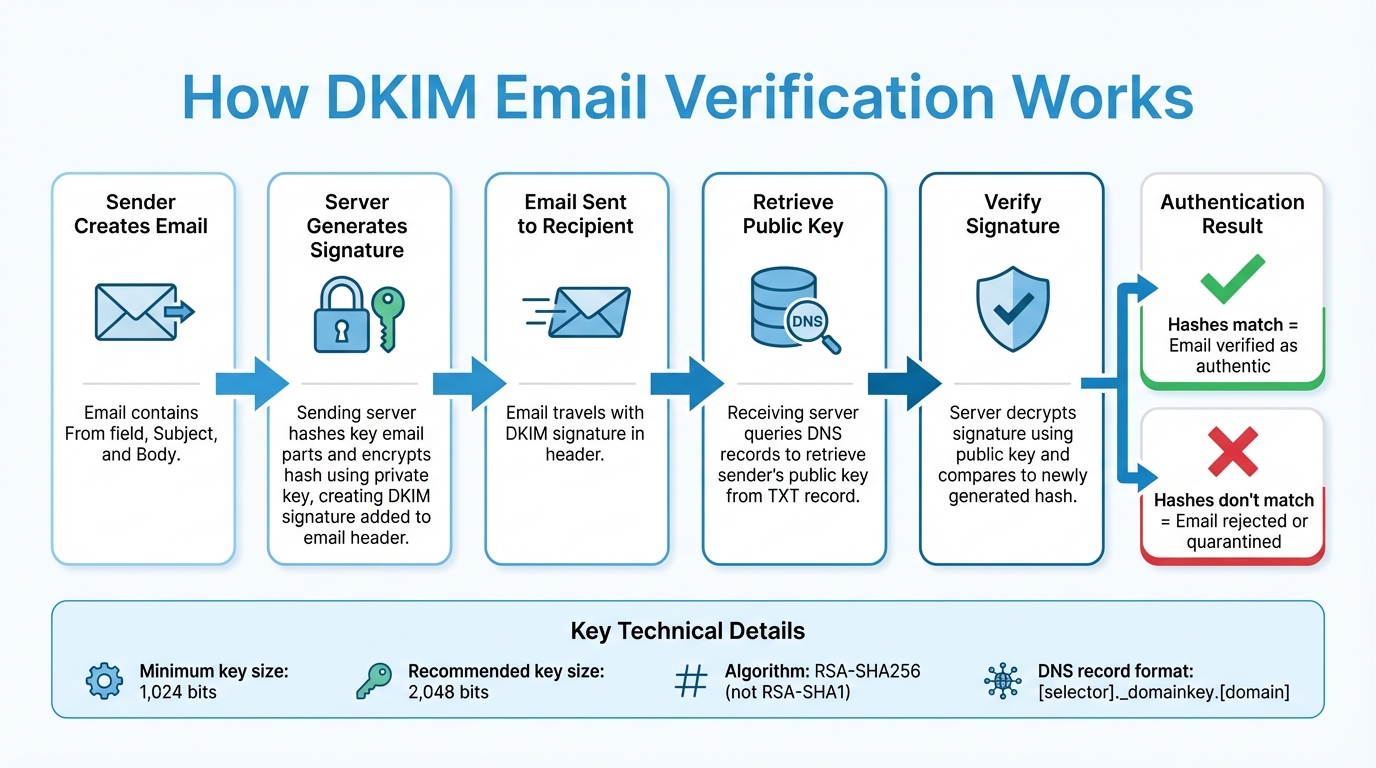
How DKIM Email Verification Works: Step-by-Step Process
How DKIM (DomainKeys Identified Mail) Works
DKIM works by hashing key parts of an email - like the From field, Subject, and Body. The sending server then encrypts this hash using a private key, creating the DKIM signature, which is added to the email header.
When the email reaches its destination, the receiving server extracts the DKIM signature and retrieves the sender's public key from DNS records. Using this public key, the server decrypts the signature and compares it to a newly generated hash of the email. If the two hashes match, the email is verified as authentic.
"DKIM (DomainKeys Identified Mail) is a protocol that allows an organization to take responsibility for transmitting a message by signing it in a way that mailbox providers can verify." - Proofpoint
To handle minor changes during email transmission - like adjustments to whitespace or header formatting - messages are processed using a canonicalization method (either Simple or Relaxed). DKIM has been an Internet Standard (STD 76) since September 2011. It uses digital signatures, which are explained in detail below, to ensure secure message authentication.
Digital Signatures and Key Pairs
At the heart of DKIM is asymmetric cryptography, which relies on two keys: a private key for signing messages and a public key for verifying those signatures. The private key is used by the sender to sign outgoing emails, while recipients use the public key - retrieved from DNS - to confirm the email's integrity.
"The digital signature will not be verified if email headers or the email body have been altered - like a tamper-proof seal on a canister of medicine." - Cloudflare
To ensure security, signing keys must be at least 1,024 bits, though 2,048-bit keys are recommended for stronger protection. Additionally, organizations should use the RSA-SHA256 algorithm instead of the older RSA-SHA1 for signing emails. Domains can manage multiple signing keys using "selectors", which allow for easier key management and rotation.
How DNS Records Enable Sender Verification
After an email is signed, DNS records play a critical role in the verification process. DNS acts as a public repository for DKIM public keys, making it easy for receiving servers to access the necessary information without relying on a centralized Certificate Authority. Public keys are stored as TXT records in a specific format: [selector]._domainkey.[domain].
When a receiving server processes an email, it extracts the selector and domain from the DKIM header, queries DNS for the corresponding TXT record, and retrieves the public key. This key is then used to verify the DKIM signature. This decentralized approach scales efficiently, even across the internet's vast number of domains - over 70 million.
"DKIM differs from traditional hierarchical public-key systems in that no Certificate Authority infrastructure is required; the verifier requests the public key from a repository in the domain of the claimed signer directly." - IETF RFC 4871
Selectors should never be reused with new keys, as doing so can create confusion between expired keys and potential forgeries. During key rotation, it's important to publish both old and new keys in DNS simultaneously to ensure emails already in transit can still be verified. This DNS-based system is a cornerstone of cryptographic sender verification, offering strong defenses against phishing and spoofing attacks.
Using Cryptographic Sender Verification to Stop Phishing
Common Phishing Tactics and Their Risks
Phishing attacks rely on deception to exploit trust, using methods like email spoofing, where the sender's address is faked to make fraudulent emails seem genuine. Business Email Compromise (BEC) schemes impersonate executives or vendors to trick organizations into authorizing wire transfers or releasing sensitive data. Whaling targets high-ranking executives, while spear phishing uses personal details to craft highly specific attacks aimed at individuals. Man-in-the-middle attacks, on the other hand, intercept and alter the content of communications. Without cryptographic tools to verify senders, recipients often struggle to distinguish real messages from fake ones.
Data highlights the scale of the issue: 95% of enterprise breaches originate from spear phishing, and 88% involve some form of human error.
How Sender Verification Blocks Phishing Attempts
Cryptographic sender verification is a powerful tool for stopping phishing, as it prevents attackers from faking valid digital signatures. Here’s how it works: when an email is sent, the outbound server creates a cryptographic hash of the message body and key headers using a private key. This hash is attached as a DKIM (DomainKeys Identified Mail) signature. The receiving server then retrieves the sender's public key from DNS records and recalculates the hash. If the two hashes align, the message is verified as authentic and unchanged.
DMARC (Domain-based Message Authentication, Reporting, and Conformance) adds another layer of protection. If cryptographic verification fails, DMARC policies instruct the receiving server to quarantine or reject suspicious emails during the SMTP process. This approach effectively stops fraudulent messages from reaching inboxes. Studies show that displaying security indicators - such as authentication status - can lower click-through rates on spoofed emails from 48.9% to 37.2%.
Together, these protocols create a multi-layered defense against phishing attempts.
Examples of Phishing Prevention in Practice
| Protocol | Protection Method | Phishing Tactic Blocked |
|---|---|---|
| SPF | Confirms the sending server's IP address is authorized | Stops unauthorized servers from sending spoofed emails |
| DKIM | Uses digital signatures to verify message source and integrity | Prevents domain spoofing and message tampering |
| DMARC | Enforces rules based on SPF and DKIM results | Blocks unauthenticated emails from reaching recipients |
The most effective strategy combines all three protocols: SPF to validate sending servers, DKIM to confirm message integrity, and DMARC to enforce strict security policies. Organizations that adopt 2,048-bit DKIM keys instead of the older 1,024-bit standard gain stronger protection against brute-force attacks. Additionally, practices like regular key rotation and proper selector management further reduce the risk of compromised credentials.
"DKIM, SPF and DMARC work together to provide the most important method for protecting email users from spam, spoofing and phishing." - Peter Loshin, Former Senior Technology Editor, TechTarget
Setting Up Cryptographic Sender Verification for Your Business
How to Set Up DKIM for Business Email
Implementing DKIM for your business email involves a few critical steps. First, you'll need to generate a private key to sign your outgoing emails. Then, publish the corresponding public key as a DNS TXT record (or a CNAME record if you're using systems like Microsoft 365).
Each key pair should be identified with a selector, such as january2026._domainkey.example.com. Selectors are useful for managing multiple keys, either for different locations or to ensure smooth key rotation. After generating your keys, configure your email server to include a cryptographic hash of the message's body and selected headers in the DKIM-Signature header.
It's a good idea to use relaxed canonicalization, which allows for minor formatting changes without invalidating the signatures. In platforms like Microsoft 365, key rotation typically takes four days (96 hours) to complete.
"DKIM protection is only as good as your DKIM setup - get the setup wrong, and DKIM will be about as helpful as a disabled home security system." - Valimail
Before fully deploying DKIM, test your setup. Tools like Gmail's "Show Original" feature or dkimcore.org can help confirm that your configuration results in a dkim=pass status.
Security Practices for External Messaging
For a stronger defense, combine DKIM with SPF and DMARC. Each plays a unique role: SPF authorizes IP addresses for sending emails, DKIM ensures message integrity, and DMARC enforces policies when these checks fail. To protect your main domain's reputation, use subdomains like marketing.contoso.com for third-party bulk email services. For domains that don’t send emails, publish a "deny all" SPF record (v=spf1 -all) to prevent spoofing attempts.
Always sign messages using the rsa-sha256 algorithm, as rsa-sha1 is outdated and offers weaker security. When starting with DMARC, use a "p=none" policy to collect reports and understand your email streams before moving to stricter policies like "quarantine" or "reject". Regularly rotate your DKIM keys to reduce the risk of exposure if a private key is compromised.
If you're working with third-party email providers, assign them unique selectors and key pairs. This way, you can revoke their access without disrupting your primary setup. Also, ensure the domain in your "From" header matches the DKIM signing domain to pass DMARC checks.
Tools and Protocols for Sender Verification
The trio of SPF, DKIM, and DMARC forms the backbone of sender verification. Among these, DKIM stands out because it survives email forwarding and provides cryptographic proof of authenticity. Starting in 2024, Gmail and Yahoo require DMARC compliance for senders managing over 5,000 emails daily.
| Protocol | Primary Function | Key Advantage | Main Limitation |
|---|---|---|---|
| DKIM | Verifies message integrity | Survives forwarding; cryptographic proof | Complex setup; doesn't stop display name spoofing |
| SPF | Authorizes sending servers | Easy to implement; prevents IP spoofing | Breaks during forwarding; limited to 10 DNS lookups |
| DMARC | Enforces policies and reporting | Improves visibility; protects reputation | Relies on SPF and DKIM to work effectively |
For generating keys, OpenSSL via the command line or tools like dkimcore.org are excellent options. Management platforms such as Microsoft Defender for Office 365, Cisco Email Security Appliance, and Cloud Email Security can streamline the process. Finally, ensure you have access to your domain registrar to publish the required DNS records.
"DKIM takes the top spot for one critical reason: it survives email forwarding and doesn't break when messages pass through multiple servers." - Hugo Pochet, Co-Founder, Mailpool
Keep in mind, SPF has a limit of 10 DNS lookups. Start by setting up DKIM, then add SPF and DMARC for comprehensive email protection. These steps provide a solid foundation for building more advanced solutions.
Eleidon's Cryptographic Sender Verification Solution
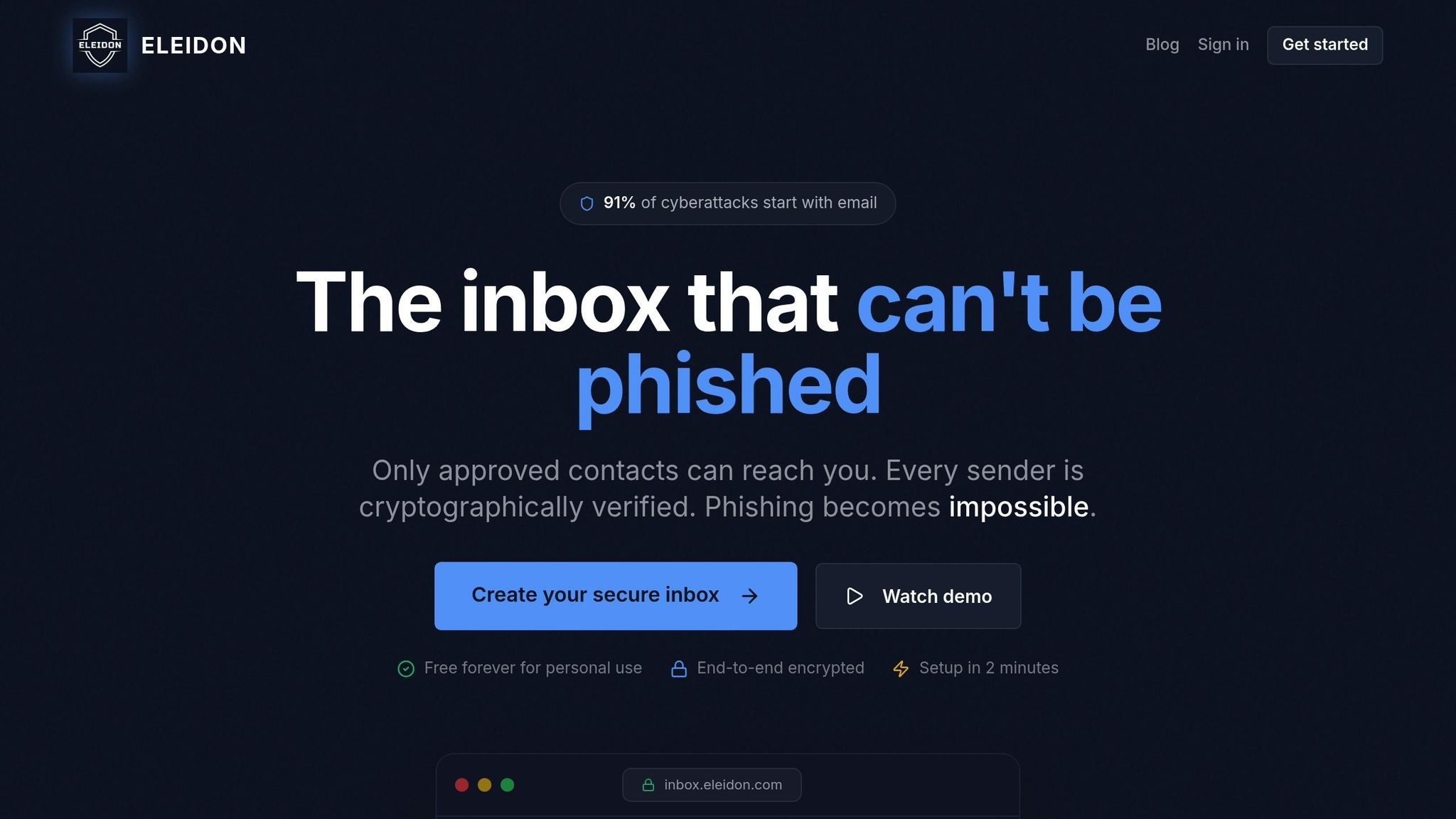
How Eleidon's Verification System Works
Traditional email security often relies on cryptographic signatures, but Eleidon takes things a step further by focusing on inbound communication control and streamlined management.
Here's how it works: Eleidon uses a digital signature to authenticate messages. When you send an email, the system creates a hash of your message content and encrypts it with your private key. The recipient can then use your public key to decrypt the signature, confirming both the sender's identity and the integrity of the message.
What makes Eleidon stand out is its trust request system, which enhances email verification. Every incoming message requires your explicit approval through this system. This challenge-response process ensures that only verified contacts can reach your inbox, completely blocking unsolicited messages. Coupled with end-to-end encryption and a zero-knowledge architecture, Eleidon ensures that even their platform cannot access your communications.
These features explain why industries requiring high levels of security turn to Eleidon for their communication needs.
Why Businesses Choose Eleidon
Industries like law, healthcare, and finance often face heightened risks from phishing and fraudulent communications. Eleidon addresses this by ensuring that phishing attempts are stopped before they even reach your inbox. The trust request system gives you full control over who can contact your team, rather than just verifying senders after the fact.
Eleidon also simplifies compliance for companies handling sensitive data. For example, it offers GDPR compliance right out of the box, which is essential for businesses operating across international borders. Custom domain support allows you to maintain your professional branding while gaining cryptographic protection. Additionally, centralized team management tools let IT administrators manage users, permissions, and security settings without dealing with complicated DNS setups or frequent key rotations.
These features align with the phishing prevention strategies discussed earlier, giving businesses strong security while keeping implementation practical and hassle-free.
Getting Started with Eleidon
Deploying Eleidon is designed to be simple and efficient.
You can begin with the Personal plan, which is completely free. This plan provides an @eleidon email address, unlimited encrypted messages, end-to-end encryption, and access across web, mobile, and desktop platforms. It’s a no-cost way to explore the trust request system and cryptographic verification.
For teams, the Team plan is available at $9 per user per month. It includes custom domain support and centralized management tools. If your organization requires additional features like encrypted key backup, multi-device syncing, and account recovery options, the Team + Vault plan at $14 per user per month has you covered. Eleidon takes care of the cryptographic infrastructure, while you retain full control over who can contact your team.
Conclusion
Key Takeaways
Cryptographic sender verification serves as a critical shield against email spoofing and phishing attacks. By implementing digital signatures and protocols like DKIM, businesses can ensure that emails genuinely come from the claimed domain and haven't been tampered with during transit. This is essential for preventing attackers from forging emails to impersonate your brand - especially given the prevalence of phishing attempts.
Beyond stopping spoofing, these measures also improve email deliverability. Verified emails are less likely to be flagged as spam by providers like Gmail and Outlook. This not only safeguards your brand's reputation but also builds trust with internet service providers (ISPs). Over time, it even enables features like BIMI, which displays your verified company logo directly in recipients' inboxes. To maximize security, it's best to use 2,048-bit keys and combine DKIM with SPF and DMARC for a comprehensive authentication strategy.
Next Steps for Securing Your Communications
To strengthen your email security, start by deploying DKIM, SPF, and DMARC protocols for your business. Use robust 2,048-bit keys and establish a key rotation schedule every 6–12 months to maintain strong defenses. Additionally, check external emails for a "DKIM=pass" header to confirm your setup is functioning correctly.
For industries with higher security needs, Eleidon offers a practical solution to simplify this process. Its trust request system ensures that only approved contacts can send emails to your inbox, effectively blocking phishing attempts. With pricing starting at $0 for individuals and $9 per user per month for teams, Eleidon makes cryptographic verification accessible while managing the technical complexities for you. This approach reinforces your email security framework without adding unnecessary overhead.
FAQs
How does cryptographic sender verification help stop phishing attacks?
Cryptographic sender verification is a powerful tool to combat phishing attacks. It works by confirming that an email truly originates from the domain it claims to represent. This is achieved through encryption-based techniques like DKIM (DomainKeys Identified Mail) and digital signatures, which authenticate the sender and ensure the email's content remains unchanged during transit.
By verifying email authenticity, this method makes it far more difficult for cybercriminals to send deceptive messages that look legitimate. For businesses, implementing these measures is a smart way to secure communications and protect sensitive data from potential threats.
How do DNS records support DKIM email verification?
DNS records are a key part of DKIM (DomainKeys Identified Mail) email verification. They house the public key in a TXT record, which allows email recipients to check the cryptographic signature of incoming messages. This process confirms that the email was sent by the legitimate domain owner and hasn't been tampered with during delivery.
By confirming both the sender's authenticity and the message's integrity, DKIM plays a critical role in defending against phishing and spoofing attempts, strengthening the security of email communication.
Why is regularly updating cryptographic keys essential for email security?
Regularly changing cryptographic keys - commonly referred to as key rotation - is a critical practice for keeping your email communications secure. Over time, keys can be at risk due to accidental exposure or evolving hacking methods. By rotating keys on a regular basis, you lower the chances of unauthorized access and ensure email signatures stay protected and reliable.
Key rotation also plays a key role in preserving the integrity of your messages. It helps shield your organization from risks like phishing scams or email spoofing. Establishing a consistent key rotation policy is a smart way to protect sensitive data and maintain the confidence of those who receive your emails.