

Top Secure Messaging Apps with Encrypted Sync
Looking for secure messaging apps with encrypted multi-device sync? Here's a quick rundown of the best options:
- Eleidon: Advanced phishing protection, encrypted multi-device sync, and GDPR compliance. Plans start at $9/user/month.
- Signal: Free, open-source, and privacy-focused with strong encryption. Syncs up to five devices locally.
- WhatsApp: Billions use it for encrypted chats, calls, and multi-device sync. Free but collects metadata.
- Wire: Enterprise-focused with strong encryption, GDPR compliance, and multi-device sync. Free personal use; paid plans for teams.
- Telegram: Popular for large groups and file sharing but defaults to server-side encryption. Secret Chats offer E2EE but don't sync.
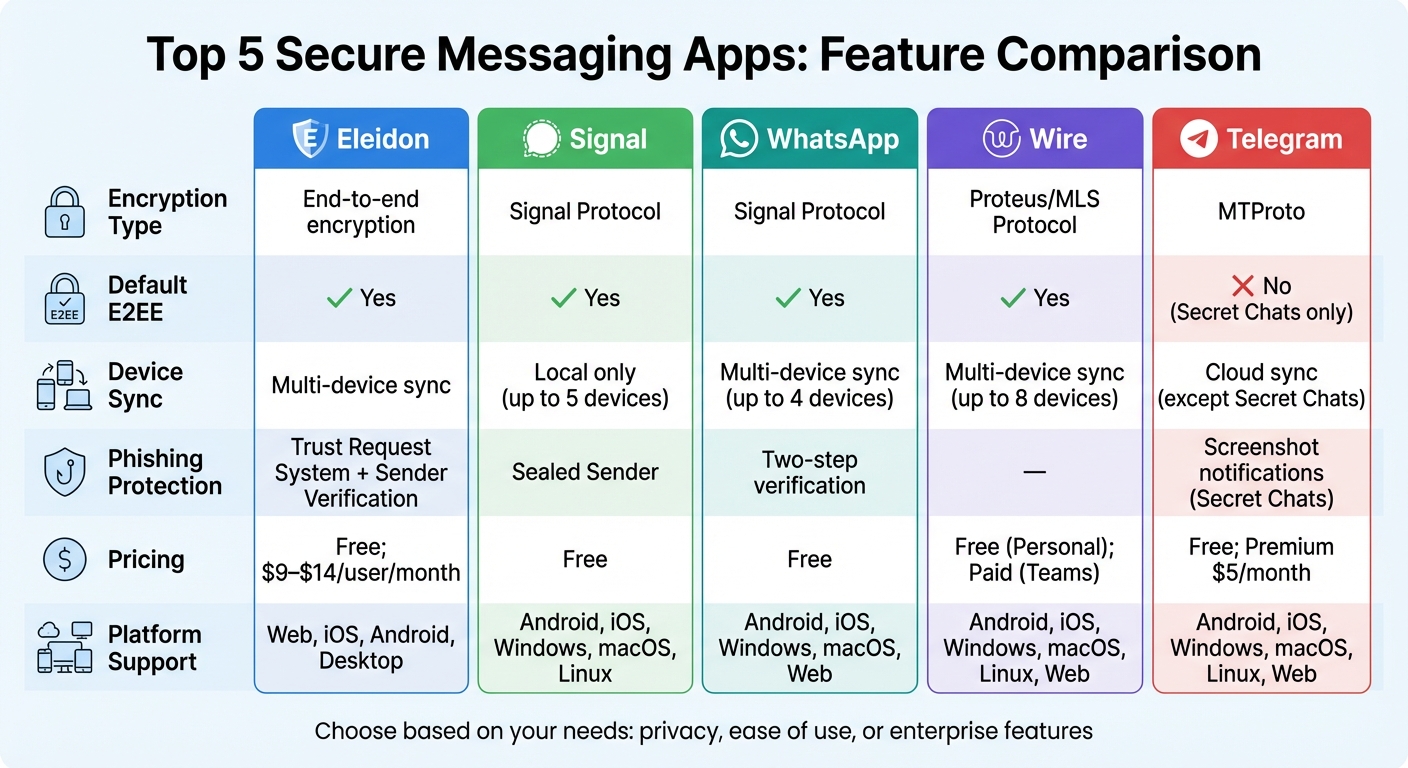
Quick Comparison Table:
| App | Encryption Type | Default E2EE | Device Sync | Pricing | Platform Support |
|---|---|---|---|---|---|
| Eleidon | End-to-end encryption | Yes | Multi-device sync | Free; $9–$14/user/month | Web, iOS, Android, Desktop |
| Signal | Signal Protocol | Yes | Local only | Free | Android, iOS, Windows, macOS, Linux |
| Signal Protocol | Yes | Multi-device sync | Free | Android, iOS, Windows, macOS, Web | |
| Wire | Proteus/MLS Protocol | Yes | Multi-device sync | Free (Personal); Paid (Teams) | Android, iOS, Windows, macOS, Linux, Web |
| Telegram | MTProto | No (Secret Chats only) | Cloud sync (except Secret Chats) | Free; Premium: $5/month or $36/year | Android, iOS, Windows, macOS, Linux, Web |
Each app has its strengths. Choose based on your needs - privacy, ease of use, or enterprise features.
Secure Messaging Apps Comparison: Encryption, Sync, and Pricing
BEST Encrypted Messaging Apps Compared: Chat Privately!
sbb-itb-804866a
1. Eleidon

Eleidon takes secure communication to the next level by combining encrypted multi-device synchronization with strong phishing defenses. It offers a secure messaging platform designed to replace traditional email systems, tackling phishing - one of the major causes of data breaches - head-on. Instead of just encrypting messages, Eleidon adds an extra layer of protection by requiring sender approval before messages ever hit your inbox.
End-to-end encryption
At its core, Eleidon uses client-side encryption, meaning encryption keys are generated and stored only on your device. This "zero-knowledge" setup ensures that no one else - not even Eleidon - can access your messages. It also meets GDPR standards, keeping your data private and secure.
Multi-device synchronization
Eleidon's Vault feature ensures seamless synchronization across multiple devices. This feature, part of the Team + Vault plan priced at $14 per user per month, securely backs up your encryption keys while guaranteeing account recovery. Crucially, your private keys stay under your control at all times.
Phishing prevention
Phishing protection is where Eleidon truly stands out. By implementing Trust Requests and Mutual Whitelists, it blocks unsolicited messages from ever reaching your inbox. Every link and attachment is scanned for malware using VirusTotal. As Eleidon puts it, "One unsolicited malicious message can cost millions" - a stark reminder of the stakes involved in secure communication.
Platform compatibility
Eleidon’s web app offers a free tier with unlimited encrypted messaging and a personal @eleidon address. For $9–$14 per user per month, the Professional tier introduces features like custom addresses and team dashboards, catering to industries such as law, healthcare, and finance. Native apps for iOS and macOS are also in the pipeline.
2. Signal
Signal has earned its reputation as a leader in secure messaging, trusted by privacy advocates and experts around the world. Created by the Signal Technology Foundation, a non-profit organization, Signal is completely free, open-source, and free of ads. Its popularity is reflected in its high ratings: 4.8/5 on the Apple App Store and 4.5/5 on Google Play. Signal combines strong encryption with smooth multi-device functionality, making it a top choice for privacy-conscious users.
End-to-end Encryption
At the heart of Signal’s security is the Signal Protocol, which employs advanced encryption techniques like the Double Ratchet Algorithm and a triple elliptic-curve Diffie–Hellman handshake. Each message is secured with a one-time key, ensuring forward secrecy. To guard against future threats, the protocol incorporates PQXDH (Post-Quantum Extended Diffie–Hellman), which is designed to counter potential quantum computing attacks. Signal also uses cutting-edge cryptographic tools like Curve25519, AES-256, and HMAC-SHA256 to protect data. Additionally, its Sealed Sender feature hides sender information from Signal’s servers, adding another layer of privacy.
"The closest piece of information to metadata that the Signal server stores is the last time each user connected to the server, and the precision of this information is reduced to the day, rather than the hour, minute, and second." - Moxie Marlinspike, Founder, Signal
Multi-device Synchronization
Signal’s multi-device functionality allows users to link up to five devices to a single account, including Windows, macOS, Linux desktops, and iPads. Messages are encrypted for each linked device using the Sesame algorithm, ensuring secure communication across all platforms. Linking a new device is straightforward: scan a QR code, and the device operates independently, even if your phone is offline. When adding a new device, Signal transfers recent chat history via an encrypted archive secured with a one-time 256-bit AES key. Devices automatically disconnect after 30 days of inactivity, and attachments are cleared after 45 days, maintaining both security and efficiency.
Platform Compatibility
Signal’s secure messaging is available across a variety of platforms, including Android (6.0+), iOS and iPadOS (15+), Windows (10/11), macOS (12+), and 64-bit Debian-based Linux systems. While a mobile device is required for initial registration, additional devices can be linked easily using a QR code. To enhance privacy further, Signal now offers usernames, allowing users to connect without sharing their phone numbers.
3. WhatsApp
WhatsApp, with its integration of the Signal Protocol, offers secure communication to billions of users worldwide. By 2025, the platform has surpassed 3 billion users, relying on the Signal Protocol since 2016 to ensure privacy and security in everyday messaging. Its combination of extensive reach and strong encryption makes it a reliable choice for those seeking secure communication.
End-to-end Encryption
WhatsApp automatically encrypts every message, call, and file using the Signal Protocol. This means each message you send is uniquely encrypted for every recipient's device through a client-fanout system. For voice and video calls, WhatsApp uses random 32-byte SRTP master secrets, which exist only in your device's memory during the call. Group chats are encrypted as well, supporting up to 1,024 members, and users can share files up to 2 GB in size.
"With end-to-end encryption on WhatsApp, your personal messages, photos, calls and more stay between you and the people you choose, meaning not even WhatsApp can see them."
- WhatsApp Privacy
However, backups to cloud services like iCloud or Google Drive require users to manually enable End-to-End Encrypted Backups for added security. WhatsApp's multi-device feature also ensures encrypted communication across all linked devices.
Multi-device Synchronization
WhatsApp allows secure linking of up to four non-phone devices through a QR code. Each device operates independently, even if your primary smartphone is offline. When you link a new device, an encrypted bundle of recent message history is transferred directly from your main device. Additionally, features like contact names, starred messages, and archived chats are synchronized via encrypted server-side storage.
"Each companion device will connect to your WhatsApp independently while maintaining the same level of privacy and security through end-to-end encryption that people who use WhatsApp have come to expect."
- Engineering at Meta
For added security, inactive devices automatically disconnect after a while, and users can remotely log out devices through the "Linked Devices" settings. WhatsApp also offers a Chat Lock feature, which allows users to hide specific conversations in a password-protected folder.
Platform Compatibility
WhatsApp supports iOS, Android, Windows, macOS, and web browsers. While registration requires a smartphone, companion devices function independently once linked. Additional features, such as silencing unknown callers and guided Privacy Checkups, further enhance user security and control over their messaging experience.
4. Wire
Wire is a secure messaging platform based in Europe, trusted by over 1,800 customers, including many German officials. Its servers are located exclusively in Germany and Ireland, ensuring compliance with GDPR and avoiding complications from extraterritorial data laws.
End-to-end Encryption
Wire takes encryption seriously, using a dual-protocol system to protect communications. For one-on-one chats, it employs the Proteus protocol, which is based on the Double Ratchet algorithm and incorporates ChaCha20, HMAC-SHA256, and Curve25519. For group conversations, Wire was the first to fully implement the IETF-standard Messaging Layer Security (MLS) protocol, supporting secure communication for groups as large as 500 participants.
"Wire's encryption works transparently in the background and doesn't need to be activated - it's always on."
- Wire Support
Every message sent through Wire is protected with a unique key, ensuring forward secrecy and security even after a potential compromise. Audio and video calls are safeguarded with Secure Real-time Transport Protocol (SRTP), with keys exchanged via Datagram Transport Layer Security (DTLS).
This robust encryption works seamlessly in the background, ensuring secure communication across devices.
Multi-device Synchronization
Wire allows users to sync their accounts across up to 8 devices, including smartphones, tablets, desktops, and web browsers. Thanks to the MLS protocol, the platform maintains excellent performance even in multi-device setups. It also features "ID Shield", which automatically verifies device identities using X.509 certificates, and supports up to three accounts on a single device.
Platform Compatibility
Wire combines strong security with accessibility. It is available on iOS, Android, Windows, macOS, Linux, and web browsers. Registration is simple, requiring only an email. The platform supports file transfers of up to 100 MB and includes self-deleting message timers for added privacy.
5. Telegram
Telegram is a cloud-based messaging app known for its speed, ability to support massive groups of up to 200,000 members, and generous file-sharing limits - up to 2 GB for standard users and 4 GB for Premium subscribers.
End-to-end Encryption
Telegram uses its proprietary MTProto protocol, but it doesn't default to end-to-end encryption. Instead, standard "Cloud Chats" rely on client-to-server encryption, meaning Telegram's servers store the decryption keys.
"Telegram's default chats are NOT end-to-end encrypted. Your messages go from your device, get decrypted on Telegram's servers, then get re-encrypted and sent to the recipient." - NovelCrypt Security Team
If you're looking for true end-to-end encryption, you'll need to manually start a "Secret Chat" for one-on-one conversations. These chats generate encryption keys that stay on the devices of the two participants, ensuring that Telegram's servers only handle encrypted data they can't read. Secret Chats also come with self-destruct timers, which can be set to delete messages after a period ranging from one second to one week. To confirm encryption, users can compare a sequence of 40 emojis or scan a QR code.
However, Secret Chats have limitations. They are tied to the device where they were initiated and don't sync across devices. Additionally, group chats and channels never support end-to-end encryption.
Multi-device Synchronization
Thanks to its cloud-based design, Telegram allows standard chats to sync instantly across all your devices - whether it's a phone, tablet, or computer. The Telegram Desktop and Web apps operate independently, so you don’t need to keep your phone connected. Security is bolstered by an "Active Sessions" feature that displays all logged-in devices, including approximate locations and IP addresses. Users are also notified immediately of any new logins, and two-step verification is available for extra protection.
On the flip side, Secret Chats are limited to the device they were started on and are generally unavailable on desktop or web versions. This makes Telegram versatile for everyday use but less so for fully encrypted conversations.
Platform Compatibility
Telegram offers native apps for Android, iOS, Windows, macOS, and Linux, as well as web interfaces. The app is free, but users can opt for a Premium subscription at $5 per month or $36 annually. Premium features include faster downloads, larger file upload limits, and an ad-free experience in public channels.
To combat phishing, Telegram uses automated algorithms and human moderation to review flagged messages in cloud chats, blocking spam and phishing attempts. Additionally, accounts are automatically deleted after a user-defined inactivity period ranging from 1 to 24 months.
Feature Comparison
Key differences among these apps include their encryption methods, device syncing capabilities, phishing protection measures, pricing structures, and platform compatibility.
| App | Encryption Type | Default E2EE | Device Sync | Phishing Protection | Pricing | Supported Platforms |
|---|---|---|---|---|---|---|
| Eleidon | End-to-end encryption | Yes | Multi-device sync | Cryptographic sender verification, trust request system | Free (Personal), $9/user/month (Team), $14/user/month (Team + Vault) | Web, iOS, Android, Desktop |
| Signal | Signal Protocol | Yes | Local only (no cloud sync) | Sealed Sender | Free | Android, iOS, Windows, macOS, Linux |
| Signal Protocol | Yes | Multi-device sync | Two-step verification | Free | Android, iOS, Windows, macOS, Web | |
| Wire | Proteus (Signal-based) | Yes | Multi-device sync | - | Free (Personal), Paid (Enterprise) | Android, iOS, Windows, macOS, Linux, Web |
| Telegram | MTProto | No (Secret Chats only) | Cloud sync (except Secret Chats) | Screenshot notifications in Secret Chats | Free; Premium: $5/month or $36/year | Android, iOS, Windows, macOS, Linux, Web |
The table above provides a snapshot of the key features, but let’s dive deeper into the details.
Encryption and Device Syncing
Encryption and syncing are handled differently across these apps. Both Signal and Eleidon default to end-to-end encryption (E2EE). However, Signal’s local-only device sync requires manual chat transfers when switching or adding devices. In contrast, Eleidon, WhatsApp, and Wire combine E2EE with multi-device syncing, making it easier to access messages across devices seamlessly.
Telegram, on the other hand, uses a hybrid approach. Regular chats rely on server-client encryption for syncing across devices, while its Secret Chats enable E2EE but are limited to the initiating device.
Phishing Protection
When it comes to phishing safeguards, Eleidon stands out with its trust request system. This requires users to approve contacts before receiving messages, alongside cryptographic sender verification for added security. Signal employs its Sealed Sender feature to shield sender identities, while WhatsApp uses two-step verification as a protective measure. Telegram provides screenshot notifications during Secret Chats to alert users of potential privacy breaches.
Pricing Models
Pricing varies significantly. Signal, WhatsApp, and Wire offer free personal use, while Telegram includes a Premium tier at $5/month or $36/year for added features. Eleidon provides a free Personal plan and paid Team plans starting at $9/user/month, with additional features available in the $14/user/month Team + Vault option.
Platform Support
All five apps support major platforms like Android, iOS, Windows, and macOS. Some, like Signal and Wire, extend compatibility to Linux, while Eleidon and WhatsApp include web access. Each app’s platform reach and approach to encryption reflect its commitment to secure and accessible communication for users across devices.
Conclusion
When choosing a secure messaging app, it’s all about finding the one that fits your specific needs. For businesses prioritizing phishing protection and GDPR compliance, Eleidon stands out. It offers encrypted syncing across multiple devices and a trust request system that ensures only approved contacts can reach you. Plus, its cryptographic sender verification helps reduce spoofing risks - especially vital in industries like law, healthcare, and finance, where human error accounts for 91% of data breaches.
Signal is a top pick for those who value privacy above all else. With minimal metadata collection and a non-profit foundation, it’s a favorite among privacy advocates. PCMag gave it a high 4.5/5 rating, citing its "uncompromising privacy".
If staying connected with a large network is your priority, WhatsApp is a practical choice due to its widespread use. However, keep in mind that while your messages are encrypted, Meta collects a significant amount of metadata.
For enterprise needs, Wire offers collaboration tools tailored for team communication. Meanwhile, Telegram is ideal for managing large groups or engaging in social networking.
"Encrypted messaging apps are no longer niche security tools - they're becoming essential for organizations that handle sensitive conversations or operate in regulated environments".
No matter which app you choose, you can enhance your security by enabling two-factor authentication and using disappearing messages on any platform.
FAQs
What does “encrypted multi-device sync” actually mean?
Encrypted multi-device sync allows users to securely access their encrypted data across multiple devices. This means you can have your information readily available on your phone, tablet, or computer without compromising on privacy or security.
The key here is encryption. It ensures that your data remains protected both during transfer and while stored, keeping it safe from unauthorized access. Whether you're switching between devices or backing up your information, encrypted sync ensures your data stays private and secure.
How can I tell if my messages are truly end-to-end encrypted?
To ensure your messages are end-to-end encrypted, make sure that only you and the recipient can access and read them. This depends on using the right encryption protocols and ensuring no third parties can intercept the data. Review the app's security features and documentation to confirm that encryption is properly set up to safeguard your conversations.
What’s the easiest way to reduce phishing in secure messaging?
To stay safe from phishing in secure messaging, never click on links or open attachments from unknown or suspicious sources. If you receive such messages, delete them immediately or report them to the appropriate channel. It's also wise to rely on systems that can verify sender identities and block unapproved contacts, reducing potential risks.