

How Real-Time Sender Reputation Stops Phishing
Phishing attacks trick users into sharing sensitive data, causing financial losses and data breaches. Traditional defenses often fail against real-time threats. Real-time sender reputation solves this by constantly evaluating email senders using AI and metrics like spam complaints, bounce rates, and engagement.
Key points:
- Real-time sender scores analyze live data to block threats instantly.
- Metrics matter: Spam complaint rates >0.1% or bounce rates >2% harm reputation.
- Authentication protocols (SPF, DKIM, DMARC) are now required by major providers like Google and Yahoo.
- Behavioral analysis tracks user interactions to detect phishing attempts.
- Tools like Eleidon add cryptographic verification for added security.
Email Sender Reputation Made Simple - by Mailtrap
sbb-itb-804866a
What Is Real-Time Sender Reputation
Email Sender Reputation Metrics: Safe Targets vs Warning Zones
Traditional sender reputation systems have been a reliable defense against phishing, but real-time systems take this a step further by constantly updating trust scores to stop threats as they happen. Real-time sender reputation involves a dynamic trust score that determines whether an email sender is legitimate or malicious at the exact moment the message is processed. Unlike static blocklists, which rely on historical data, this system uses AI and machine learning to analyze live data and make split-second decisions to deliver, quarantine, or block emails.
This method builds on the established IP, domain, and entity dimensions, making it increasingly difficult for phishing attackers to hide behind new IP addresses or spoofed domains.
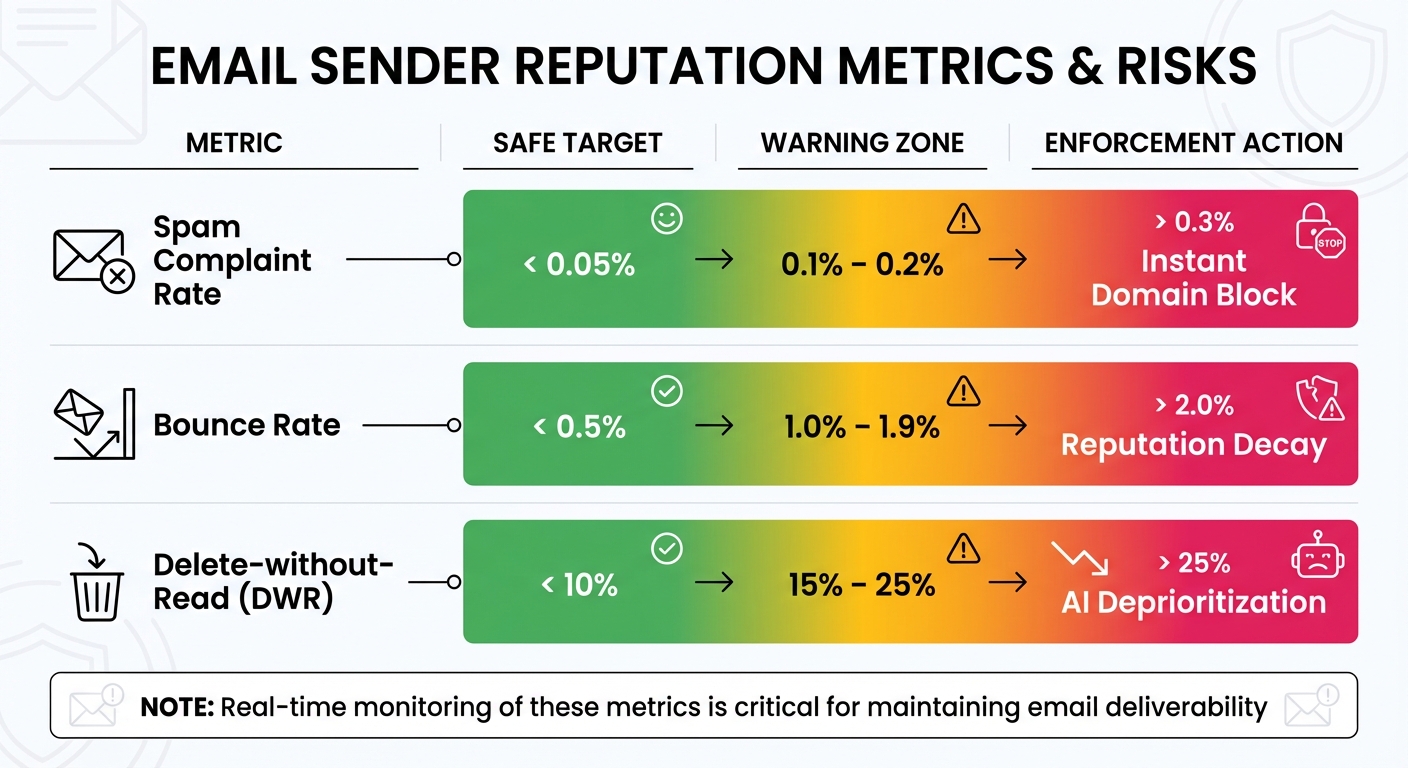
The system also monitors key metrics in real time, such as how quickly users interact with emails. Interaction velocity - the speed at which recipients engage with messages - acts as an immediate trust signal. Emails that are consistently deleted without being read cause the sender's score to drop significantly. For example, a Delete-without-Read (DWR) rate between 15% and 25% triggers AI deprioritization, often relegating future emails to "Promotions" or "Clutter" folders.
How Sender Reputation Scores Work
Sender reputation scores are calculated using measurable metrics that combine technical compliance with user behavior, providing a strong defense against phishing attempts. Two critical factors are spam complaint rates and hard bounce rates. For instance, a spam complaint rate above 0.1% (one complaint per 1,000 emails) or a hard bounce rate exceeding 2% can lead to reputation damage and even delivery rejection. Microsoft Exchange assigns a Sender Reputation Level (SRL) on a scale from 0 to 9, where 0 represents a trusted sender and 9 flags a likely spammer.
Recipient engagement also plays a major role in these scores. Email providers track actions like opening messages, clicking links, moving emails to folders, or marking them as spam. Using personalized subject lines can boost open rates by 26%, signaling positive engagement and improving sender reputation. However, even with these efforts, the industry average for email deliverability is 85%, meaning 15% of legitimate emails still fail to reach the inbox due to reputation challenges.
| Metric | Safe Target | Warning Zone | Enforcement Action |
|---|---|---|---|
| Spam Complaint Rate | < 0.05% | 0.1% – 0.2% | > 0.3% (Instant Domain Block) |
| Bounce Rate | < 0.5% | 1.0% – 1.9% | > 2.0% (Reputation Decay) |
| Delete-without-Read (DWR) | < 10% | 15% – 25% | AI Deprioritization |
These real-time scores offer a more dynamic alternative to static reputation checks, which we'll explore further.
Real-Time vs. Static Reputation Checks
Understanding the difference between real-time and static reputation systems is key to grasping their role in phishing prevention. Static reputation checks rely on historical data and fixed blocklists that are manually updated. These systems pull a sender's stored reputation score at the start of an email connection and base blocking decisions on past behavior. While effective against known threats, this approach is reactive - it only blocks senders after a pattern of abuse has been established.
Real-time reputation systems, on the other hand, update scores immediately after processing each message. This allows them to analyze the email's content, sending patterns, and recipient interactions as they happen. By doing so, they can detect threats based on current behavior, not just historical data.
"In 2026, mailbox providers are using advanced AI filters that analyze user behavior in real time. Your ability to land in the primary inbox now depends on a new standard of trust and engagement." - Email Sequence
This shift to real-time monitoring addresses critical gaps in phishing defense. Static systems often miss subtle but harmful signals, like high Delete-without-Read rates or abrupt changes in sending behavior. Real-time systems catch these signals instantly, using AI-driven sentiment analysis and interaction velocity to flag phishing attempts before they reach users. Since 2024, providers like Google and Yahoo have also started tracking the organizational entity behind domains, making it much harder for malicious actors to evade poor reputation scores by switching IP addresses.
Authentication Protocols for Sender Verification
Combining real-time reputation scores with SPF, DKIM, and DMARC helps verify sender identity before emails are delivered. Together, these protocols form a strong defense against phishing attempts that spoof legitimate domains. Here's how they work:
- SPF (Sender Policy Framework) acts like a "guest list", identifying which IP addresses are allowed to send emails on behalf of your domain.
- DKIM (DomainKeys Identified Mail) ensures email integrity by using digital signatures to confirm that messages haven't been altered during transit.
- DMARC (Domain-based Message Authentication, Reporting, and Conformance) connects SPF and DKIM, requiring the domain validated by either protocol to match the visible "From" header.
Without this alignment, attackers could exploit SPF by using their own domain while spoofing your domain in the "From" field - a classic phishing strategy. Starting in 2024, Google and Yahoo mandated SPF and DKIM for all senders and DMARC for those sending over 5,000 emails daily. Microsoft Outlook adopted similar requirements in May 2025. This shift underscores a key point in email security:
"Authentication is no longer optional; it is a requirement for reaching the inbox."
– SenderReputation.org
Setting Up SPF, DKIM, and DMARC
To avoid blocking legitimate emails, start by auditing all email services you use, such as Google Workspace, Mailchimp, Zendesk, or other third-party tools.
SPF Setup
Create a single DNS TXT record at your root domain listing all authorized email services. Here's an example:
v=spf1 include:_spf.google.com include:sendgrid.net -all
The -all qualifier enforces a hard fail, instructing servers to reject unauthorized emails. Ensure you have only one SPF record per domain and monitor the 10 DNS lookup limit - exceeding it causes errors. If needed, use ip4: or ip6: for static IPs, as these don't count toward the lookup limit.
DKIM Setup
Generate cryptographic keys for each email service and add the corresponding TXT or CNAME records to your DNS under a unique selector (e.g., s1._domainkey). Many providers offer CNAME records for automatic key rotation, simplifying maintenance.
DMARC Setup
Add a TXT record at _dmarc in your DNS. Start with a monitoring policy like this:
v=DMARC1; p=none; rua=mailto:reports@yourdomain.com
This setup collects XML reports over 2–4 weeks without affecting email delivery. Review these reports to confirm all legitimate sources pass authentication. Once verified, update your DMARC policy to p=quarantine (to send failing emails to spam) and eventually to p=reject (to block unauthenticated messages). Studies show that moving to a reject policy can improve email deliverability by over 10% with major providers.
| DMARC Policy | Action | Purpose |
|---|---|---|
| p=none | Monitor | Collect data without affecting delivery |
| p=quarantine | Spam | Send failed emails to the junk folder |
| p=reject | Block | Prevent unauthenticated emails from being delivered |
These configurations prepare your system for DMARC enforcement, offering a proactive approach to email security.
How DMARC Prevents Phishing
DMARC takes your SPF and DKIM setup a step further by enforcing identifier alignment, which prevents spoofing. While SPF checks the hidden envelope sender (Return-Path) and DKIM ensures email integrity, DMARC ensures that the domain in the "From" header matches the one validated by SPF or DKIM. This alignment is critical for stopping phishing attempts.
Additionally, the rua tag in your DMARC record provides aggregate reports, helping you spot unauthorized attempts to use your domain. For stronger protection, enable strict alignment (adkim=s, aspf=s), which requires an exact domain match rather than a shared organizational domain.
"DMARC is the policy layer that makes everything actionable. Without it, even if SPF and DKIM fail, the receiving server has no guidance on what to do."
– Akash Bhadange, CEO, AutoSend
Phishing remains a major threat - 93% of phishing emails include encryption ransomware, and phishing attacks doubled in 2018, according to Kaspersky Lab. By enforcing DMARC at the p=reject level, you can block these threats before they reach users. This turns authentication from a passive check into an active defense, protecting both your domain and your recipients. Paired with real-time reputation analysis, these protocols stop phishing at its source.
Monitoring and Detecting Phishing in Real Time
After setting up SPF, DKIM, and DMARC, the next step is implementing real-time monitoring to spot phishing attempts before they harm your reputation or compromise your recipients. Modern AI-driven filters evaluate trust based on interaction velocity. For instance, if your emails cause a spike in spam complaints within the first hour of a campaign, AI systems can automatically pause or slow delivery through predictive throttling to minimize further damage.
Real-time detection extends beyond technical authentication. Inbox providers now track the specific organization behind your domain, enabling them to distinguish between companies even if they share the same sending infrastructure. This means your reputation is tied directly to your behavior rather than just your IP address. Failing to meet certain thresholds can lead to immediate delivery penalties.
Configuring Alerts for Suspicious Activity
Set up multi-channel alerts to catch issues as soon as they arise. For example, configure monitoring tools to send instant notifications via SMS or Slack whenever critical thresholds are breached - such as a bounce rate above 2% or a complaint rate exceeding 0.1%. While email alerts are useful for daily or weekly reports, high-priority issues like your domain or IP being added to a global blacklist require immediate attention through more visible channels.
Take advantage of free tools like Google Postmaster Tools, Microsoft SNDS, and Yahoo Sender Hub to gather platform-specific data on reputation and delivery errors. These tools provide insights into how Gmail, Outlook, and Yahoo view your sending practices. For broader monitoring, use automated tools to scan major DNS-based blocklists (DNSBLs) daily and alert administrators within minutes if your domain appears on one. Additionally, integrate real-time verification APIs to clean your email lists by removing hard bounces and invalid addresses at the signup stage. This proactive approach helps protect your reputation before you even send a single email.
Combining Behavioral and Content Analysis
Behavioral analysis works by establishing a baseline of normal user activity - such as browsing habits, mouse movements, and typing patterns - and flags any unusual deviations in real time. For instance, if a user clicks a suspicious link without hesitation, the system might identify this as a phishing interaction. Meanwhile, content analysis focuses on the technical aspects of emails, scanning for suspicious headers, malicious attachments, and urgent language.
When combined, these methods create a layered defense system. Content analysis detects known malicious patterns and overly enticing offers, while behavioral analysis identifies more sophisticated phishing attempts, such as those sent from compromised but seemingly "trusted" accounts. Alarmingly, 48% of phishing attacks originate from compromised accounts, which can bypass reputation-based detection systems. Modern tools also employ Time-of-Click analysis to block malicious links as soon as they’re accessed and use Deep Content Disarm & Reconstruction (CDR) to neutralize threats hidden in attachments before they reach users.
"Real-time phishing detection is critical - not only for preventing breaches but for protecting an organization's bottom line and reputation."
– OPSWAT
If your reputation takes a hit, you can enact a 14-Day "Heal" Protocol. This involves reducing your sending volume by 70% and focusing only on "Super-Engaged" users - those who have been active within the past 30 days - to rebuild positive engagement signals. These strategies ensure your reputation remains intact while supporting ongoing phishing detection efforts, setting the stage for the next steps in reputation management.
Maintaining a Strong Sender Reputation
Ensuring your emails consistently land in inboxes requires more than just monitoring - it demands active reputation management. The three key reputation factors - IP address, domain, and organizational entity - must be carefully managed to maintain trust with inbox providers. By 2026, inbox providers are tracking the organization behind your domain, making reputation more tied to your long-term behavior rather than just technical details.
"Your email sender reputation is a score inbox providers assign to your domain and IP based on your sending behavior. It's built over time... and it can take months to build but only weeks to damage."
– Grant Ammons, Founder, Truelist
Think of sender reputation as the email equivalent of a credit score. It determines whether your messages land in the inbox or get flagged as spam. Protecting this reputation means keeping a close eye on metrics like complaint rates, bounce rates, and user engagement.
Keeping Spam Complaint Rates Low
One of the most critical aspects of reputation management is controlling spam complaint rates. Gmail intervenes when complaints hit 0.3%, but even 0.1% is considered risky. To stay in the clear, aim for complaint rates below 0.08%. The easiest way to achieve this? Make unsubscribing simple. If recipients can’t easily opt out, they’re more likely to hit the “spam” button, which can severely damage your reputation.
"A visible, one-click unsubscribe link reduces spam complaints. Users who can't unsubscribe easily hit the spam button instead - which is much worse for your reputation."
– Alex Thompson, CEO, ZeonEdge
Every email should include a prominent, one-click unsubscribe link. Adding List-Unsubscribe headers also allows users to opt out directly from their inbox. To improve engagement, use personalized subject lines and avoid aggressive language or fake urgency, which can trigger spam filters and user complaints.
Another safeguard is using a double opt-in process for new subscribers. This ensures only valid, interested users are added to your list, reducing the risk of fake or mistyped email addresses.
Email List Maintenance and Volume Scaling
Maintaining a clean email list is essential for protecting your sender reputation. Remove hard bounces immediately - addresses that result in permanent delivery failures should be deleted to avoid penalties. A hard bounce rate above 2% can harm your deliverability and reputation.
Set a sunset policy to automatically suppress or remove inactive subscribers after 90–180 days of no engagement. Inactive users are more likely to mark your emails as spam, putting your reputation at risk. Before removing them, try a re-engagement campaign to win them back. To prevent invalid addresses from entering your list in the first place, use email verification APIs at signup.
When scaling your email volume, take it slow. Sudden spikes can make inbox providers suspicious, potentially flagging your account. For new IPs or domains, start small - send 50–250 emails per day to your most engaged users during the first week. Gradually increase to 10,000–25,000 emails by week four, keeping a close eye on Google Postmaster Tools for any issues. Consistent and predictable sending patterns are key to maintaining a stable reputation.
| Metric | Healthy Benchmark | Danger Zone |
|---|---|---|
| Bounce Rate | < 2% | > 2% |
| Spam Complaint Rate | < 0.1% | > 0.3% (Gmail Action) |
| Sunset Policy | 90–180 days | 6+ months of inactivity |
Regularly monitor tools like Google Postmaster Tools, Microsoft SNDS, and Yahoo Sender Hub to track your domain reputation, spam rates, and authentication success. Use automated systems to scan DNS-based blocklists daily and alert you if your domain is flagged. If your reputation takes a hit, recovery can take anywhere from 2–4 weeks for minor issues to 2–3 months for severe damage.
How Eleidon Stops Phishing with Sender Verification
Email systems often operate on protocols that lack built-in trust enforcement, leaving them vulnerable to phishing attacks. Eleidon flips the script by using cryptographic sender verification paired with a strict approval process. This ensures that no unsolicited messages ever make it to your inbox. Industries like law, healthcare, and finance - where phishing emails can have devastating consequences - benefit greatly from this approach. For example, law firms deal with sensitive client data, healthcare providers handle HIPAA-protected information, and financial institutions manage high-stakes transactions. Eleidon’s system works seamlessly with the real-time reputation analysis mentioned earlier, stopping threats before they even surface.
"Phishing remains the #1 cause of data breaches. One unsolicited malicious message can cost millions." – Eleidon
While traditional email technologies like SPF and DKIM confirm server and domain legitimacy, they don’t verify the sender’s identity. Eleidon fills this gap with Ed25519 digital signatures, which mathematically authenticate senders. Here’s how it works: when you send an email, your private key (kept securely on your device) signs a canonical hash of the message content. Recipients can instantly verify this signature via Eleidon's /v1/verify API. The result? Verified messages score 1.0, while phishing attempts score 0.0.
Eleidon's Phishing Prevention Features
Eleidon tackles phishing from multiple angles. Each outgoing email includes an X-Eleidon-Signature header, which contains the sender’s agent ID and cryptographic signature. To maintain consistency across email platforms, Eleidon standardizes key message fields - such as From, To, Subject, Timestamp, and Body-Hash - before hashing and signing.
But it doesn’t stop there. Eleidon also integrates VirusTotal scanning to analyze every link and attachment for malware. All messages are secured with end-to-end encryption, meaning only you and the recipient can read them - even Eleidon itself has no access. For businesses navigating regulatory waters, the platform meets GDPR standards and supports HIPAA-compliant communications, making it a strong choice for healthcare and other regulated industries. Together, these layers create a comprehensive security framework, paving the way for the platform’s approval system.
Managing Trust with Eleidon's Approval System
Eleidon builds on its cryptographic defenses with a trust-based approval model. Unlike traditional email, where anyone can message you, Eleidon requires senders to request approval before communication can begin. This creates a mutual whitelist, ensuring phishing emails never reach your inbox.
"Senders need your explicit approval via trust requests which means no spam, no spoofing, and no phishing." – James, Founder of Eleidon
This approach is particularly valuable for industries like finance. Imagine receiving a fraudulent email asking you to transfer funds - on Eleidon, it wouldn’t even appear in your inbox unless the sender had been pre-approved. The verification system categorizes results as "verified", "unknown", or "fraudulent." Fraudulent status is immediately flagged for issues like invalid signatures, mismatched sender information, or malformed headers.
For teams, Eleidon offers two pricing tiers. The Team plan is available at $9/user/month, featuring centralized management and custom domain support. The Team + Vault plan, priced at $14/user/month, adds encrypted key backup and multi-device synchronization. These options make Eleidon accessible for both small teams and larger organizations looking to lock down their email security.
Conclusion
Real-time sender reputation is changing the way phishing defenses operate, moving the approach from reactive to proactive. While SPF and DKIM protocols verify email servers, they don't provide insight into the behavior or identity of the sending organization. Modern reputation systems function more like a dynamic credit score, relying on immediate signals - such as bounce rates, spam complaints, and engagement metrics - to help inbox providers block threats before they reach their destination.
For example, Gmail filters are triggered when spam complaint rates hit 0.3%, and bounce rates exceeding 2% can result in penalties. This can lead to up to 15% of legitimate emails being blocked. In industries like healthcare, finance, and law, where secure communication is critical, these delivery gaps can cause significant disruptions.
Ongoing reputation monitoring plays a crucial role in mitigating these risks.
"Sender reputation is the gatekeeper of your email deliverability." – MailValid
Tools like Google Postmaster Tools and Microsoft SNDS allow organizations to track and address reputation issues as they arise. For those managing sensitive communications, cryptographic verification offers an additional layer of protection that traditional protocols can't provide. Eleidon’s use of Ed25519 signatures is a strong example of how cryptographic verification enhances sender legitimacy. By combining real-time monitoring with cryptographic approvals, Eleidon demonstrates how a robust, phishing-resistant system can be created. When paired with an approval-based trust system, this ensures that unauthorized senders are blocked from inboxes unless explicitly permitted.
Looking ahead, reputation tracking is evolving to tie sender identity directly to organizational behavior. By 2026, entity-based reputation tracking will make it harder for malicious actors to exploit shared infrastructure or reset their reputation simply by switching IP addresses. Together, real-time monitoring, strong authentication, and cryptographic verification create a secure environment, continually building and maintaining trust.
FAQs
What signals can hurt my sender reputation fastest?
The quickest ways to harm your sender reputation are tied to poor email practices. These include spam complaints, low engagement metrics (such as weak open and click rates), sending messages to spam traps, abrupt increases in email volume, and relying on blacklisted IPs or domains. Each of these issues sends a clear signal that your email strategy needs improvement and can severely impact your deliverability.
How do SPF, DKIM, and DMARC work together to stop spoofing?
SPF, DKIM, and DMARC combine forces to help verify that emails are legitimate and to block spoofing attempts. SPF checks if the email is sent from an authorized IP address, DKIM adds a cryptographic signature to ensure the email hasn’t been tampered with, and DMARC sets rules for handling emails based on SPF and DKIM outcomes. Together, they form a multi-layered approach to protect against fraudulent emails.
How does Eleidon verify a sender and block unknown contacts?
Eleidon uses a clever system to verify senders. It starts by generating a cryptographic key pair and linking the public key to the sender’s inbox. To confirm ownership, the sender completes a challenge by responding to an email with a unique code. Once verified, all messages are signed with the sender's private key. Recipients can then authenticate these messages using Eleidon's verification tools. This process ensures that only approved contacts can send messages, keeping unknown or unwanted senders out of the picture.