

Encryption Audit Checklist for Compliance
Encryption audits are critical for safeguarding sensitive data, avoiding costly breaches, and meeting regulatory requirements. With data breaches costing U.S. companies an average of $10.22 million by 2025, encryption is no longer optional - especially in industries like healthcare, where regulations like HIPAA and PCI DSS demand strict encryption controls.
Here’s what you need to know:
- Why it matters: Encryption minimizes risks by protecting sensitive data at rest and in transit. It also ensures compliance with frameworks like SOC 2, ISO 27001, and NIST.
- Key steps:
- Review policies: Ensure clear documentation on encryption methods, algorithms (e.g., AES-256, RSA 2048+), and roles.
- Assess protocols: Use TLS 1.2+ for data in transit and AES-256 for data at rest while disabling outdated protocols like TLS 1.0.
- Manage keys: Use FIPS-compliant tools for key generation, storage, rotation, and revocation.
- Technical controls: Enable full disk encryption, monitor key access, and patch vulnerabilities promptly.
- Test and audit: Regularly conduct risk assessments, third-party audits, and incident response drills.
Encryption is your last line of defense. Following these steps ensures compliance while reducing risks of data exposure and legal penalties.
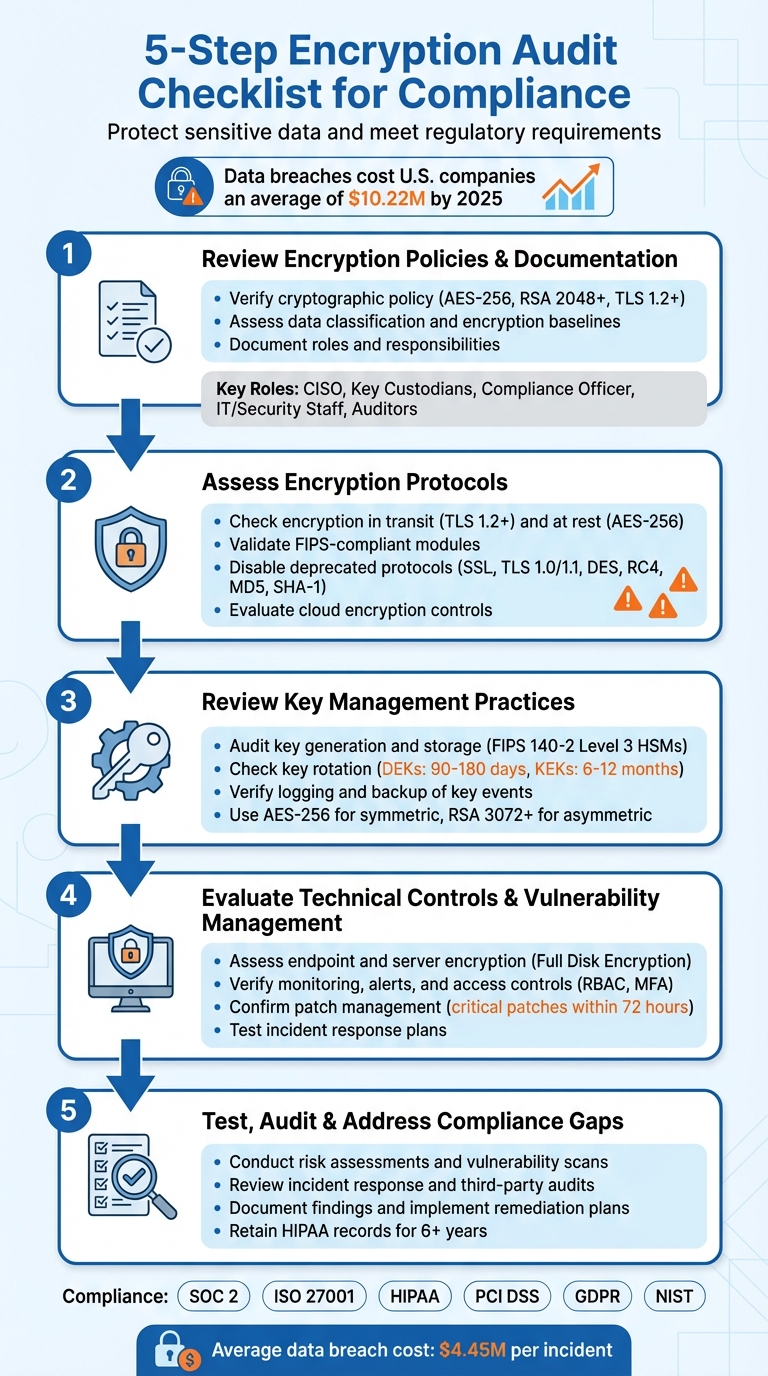
5-Step Encryption Audit Checklist for Compliance
8 Cryptographic Key Management Best Practices
sbb-itb-804866a
Step 1: Review Encryption Policies and Documentation
Start by checking your organization's documented encryption policies. Without clear guidelines, it’s tough to ensure data protection or prove compliance. These documents serve as the groundwork for evaluating protocols and key management in later steps.
Verify Cryptographic Policy
Having a strong cryptographic policy is essential to meet regulatory demands. This policy should clearly define approved algorithms, key lengths, and protocols that align with current industry standards. For example:
- Use AES-256 in GCM or XTS mode for encryption.
- Opt for RSA with at least a 2,048-bit key (3,072-bit preferred) or ECC.
- Protect data in transit with TLS 1.2 or higher (ideally TLS 1.3).
"What was secure two years ago may not be today. Allowing the 'set it and forget it' attitude will soon result in new vulnerabilities." - ISO-Docs
The policy should also address exceptions - detailing when encryption isn’t used, why, and what alternative safeguards are in place.
Assess Data Classification and Encryption Baselines
Your audit should confirm the existence of a data classification policy that identifies sensitive data types like PII, financial data, or ePHI. This policy should also establish encryption standards for each category. For example:
- Encryption at rest: Applies to databases, backups, and endpoints.
- Encryption in transit: Covers email, APIs, and web traffic.
External communication platforms must also meet these encryption standards. For instance, solutions like Eleidon rely on such policies to ensure secure end-to-end encryption in sensitive industries. Under regulations like HIPAA, encrypted data that meets industry standards may not be considered a reportable breach, even if lost or stolen.
Document Roles and Responsibilities
Define and document who manages encryption and who uses it. Clear role assignments ensure accountability and align with the principle of least privilege. Here’s a breakdown of key roles:
| Role | Responsibility in Encryption Management |
|---|---|
| Security Officer / CISO | Defines policies, performs risk analysis, and oversees strategy |
| Key Custodians | Manages the cryptographic key lifecycle (from generation to destruction) |
| Compliance Officer | Ensures encryption controls meet regulatory requirements (e.g., SOC 2, HIPAA) |
| IT / Security Staff | Implements technical controls, patches systems, and scans for vulnerabilities |
| Auditors | Conducts periodic testing and verifies audit evidence |
To reduce risk, enforce multi-factor authentication (MFA) for all admin or service accounts managing encryption keys. This dual-control approach minimizes the chances of a single point of failure and aligns with compliance standards. Clear role assignments and strong access controls help streamline audits and maintain compliance.
Step 2: Assess Encryption Protocols
Once your policies are documented, the next step is to ensure your encryption protocols align with established standards. This involves verifying that your systems are using secure, up-to-date algorithms while disabling any outdated or vulnerable protocols. Essentially, it’s about making sure your technical setup meets the required audit standards.
Check Encryption in Transit and At Rest
For data in transit, enforce TLS 1.2 as the minimum, though TLS 1.3 is preferred for new deployments. It’s worth noting that AWS will no longer support TLS 1.0 and TLS 1.1 for API endpoints starting February 2024. Additionally, use HTTP Strict Transport Security (HSTS) to prevent browsers from falling back to unencrypted HTTP connections.
For data at rest, AES-256 is the recommended standard for encrypting databases, file systems, and backups. While AES-128 meets the base requirements for SOC 2 compliance, opting for AES-256 provides stronger protection for newer deployments. Make sure secure modes like GCM (Galois/Counter Mode) or XTS are in use, as these provide both confidentiality and integrity. Specifically for disk encryption, XTS-AES is a solid choice.
"Encryption serves as your last line of defense, rendering stolen data useless to attackers who lack the decryption keys." - Secure Systems
For environments requiring the highest level of security, consider implementing double encryption at both the infrastructure and application layers.
Validate FIPS-Compliant Modules and Disable Deprecated Protocols
In regulated industries, cryptographic modules must often meet FIPS 140-2 or FIPS 140-3 validation standards. If you’re auditing third-party tools or cloud services, ask for documentation to confirm compliance. For instance, Azure Key Vault offers varying levels of FIPS validation: Level 1 for software-protected keys, Level 2 for HSM-protected keys in Premium vaults, and Level 3 for Managed HSM.
Scan your systems for outdated protocols and weak ciphers. Disable SSL (all versions), TLS 1.0, TLS 1.1, and algorithms like RC4, DES, and Triple DES. Ensure that RSA keys below 2,048 bits are no longer in use - while 2,048 bits is the minimum, 3,072 bits or higher is recommended for long-term security [2,10]. For hashing, stick to the SHA-2 family (e.g., SHA-256, SHA-384, SHA-512), as SHA-1 and MD5 are no longer secure.
| Category | Strong | Deprecated / Vulnerable |
|---|---|---|
| Protocols (Transit) | TLS 1.2, TLS 1.3 | SSL v2/v3, TLS 1.0, TLS 1.1 |
| Symmetric (At Rest) | AES-256, AES-128 | DES, RC4, Triple DES |
| Asymmetric | RSA 2048+, ECC P-256/P-384 | RSA 1024-bit |
| Hashing/Integrity | SHA-256, SHA-384, SHA-512 | MD5, SHA-1 |
Extend these checks to cloud environments to ensure a thorough review of your encryption protocols.
Evaluate Cloud Encryption Controls
In cloud setups, verify that storage services like Amazon S3 or Azure Managed Disks have encryption enabled by default. Use customer-managed keys for greater control when needed [21,20]. Additionally, enforce cloud-specific security measures. For example, S3 bucket policies should explicitly deny non-HTTPS traffic using the aws:SecureTransport condition, and Azure Storage should have "Secure transfer required" enabled [21,20].
"Encryption helps maintain data confidentiality even when the data transits untrusted networks." - AWS Well-Architected Framework
For microservices architectures, ensure that a service mesh enforces mutual TLS (mTLS) for all inter-service communication. Automate certificate management to avoid downtime from expired certificates using tools like AWS Certificate Manager (ACM) or Azure Key Vault [21,23]. For workloads requiring extra security, consider Confidential Computing with Trusted Execution Environments (TEEs) to safeguard data during processing.
Store sensitive decryption keys in Hardware Security Modules (HSMs) or managed cloud Key Management Services, rather than embedding them in application code or configuration files. Keep keys separate from the encrypted data and enforce identity-based, least-privilege access controls [20,23]. For industries with strict communication requirements, platforms like Eleidon illustrate these principles by offering end-to-end encryption and cryptographic sender verification to meet compliance needs.
Step 3: Review Key Management Practices
Once you've ensured your encryption protocols are up to date, it's time to focus on key management. Even the strongest encryption can fall apart if key generation, storage, or rotation isn't handled properly. This step involves confirming that your organization’s practices for managing encryption keys meet compliance standards and align with industry best practices.
Audit Key Generation and Storage
Start by verifying that key generation is performed using FIPS 140-2 Level 3/FIPS 140-3 validated HSMs or certified cryptographic libraries. These tools ensure that private keys remain secure and never leave the hardware boundary in plaintext. Additionally, check that cryptographically secure random number generators (CSPRNGs), compliant with standards like NIST SP 800-90A, are used to provide sufficient randomness during key creation.
For symmetric encryption, ensure keys are generated using AES-256, while asymmetric encryption should rely on at least RSA 3,072-bit (ideally 4,096-bit) or ECC P-384/P-521. High-value keys, such as those used by Root Certificate Authorities, should follow formal key ceremonies involving multiple participants, witnesses, and strict authorization protocols.
"The security of your entire PKI infrastructure is only as strong as your weakest key management practice." - Axelspire
Keys must be stored securely within isolated cryptographic modules or dedicated vaults, never in plaintext, version control systems, or web-accessible locations. Use services like AWS KMS, which employs FIPS 140-2 Level 3 validated HSMs to store non-exportable keys securely. Ensure that Role-Based Access Control (RBAC), Multi-Factor Authentication (MFA), and the principle of least privilege are applied to all key-related operations. Once key generation and storage are verified, move on to assess key rotation and revocation processes.
Check Key Rotation, Revocation, and Recovery
Implement automated, policy-driven rotation for your keys using a Key Management Service (KMS) or Hardware Security Module (HSM). For Data Encryption Keys (DEKs), enforce a rotation schedule of 90 to 180 days, while Key Encryption Keys (KEKs) should rotate every 6 to 12 months. Ensure your system supports multiple key versions, allowing new data to be encrypted with the latest key while older data remains decryptable using previous versions.
Establish immediate revocation processes for scenarios like employee departures, suspected key compromises, or security incidents. For instance, AWS KMS requires a 30-day waiting period before key destruction, providing a safeguard against accidental or malicious deletion. Regularly test recovery mechanisms, such as key escrow or Shamir's Secret Sharing, to ensure lost keys can be restored without compromising data. Retired keys should be securely destroyed using "zeroization" as defined by NIST SP 800-88 or through cryptographic erasure to prevent reconstruction.
Verify Logging and Backup of Key Events
All key lifecycle events - such as generation, access, rotation, and destruction - should be logged in immutable audit logs. These logs should be centralized, encrypted using AES-256, and stored separately from general administrative logs to prevent unauthorized tampering.
Set up automated alerts to flag unusual activity, like spikes in decryption requests or unauthorized key deletion attempts. For backup security, use Shamir's Secret Sharing to distribute key material among multiple custodians, ensuring no single individual can reconstruct the key independently. When exporting logs for audits, encrypt the data using secure tools and formats designed for portable media. Platforms like Eleidon exemplify these principles by maintaining encrypted communication logs and cryptographic verification trails that align with compliance requirements.
Step 4: Evaluate Technical Controls and Vulnerability Management
Encryption policies aren't just about having rules on paper - they need to be active and effective across all devices, servers, and communication channels. This step is about ensuring that technical controls are functioning as intended and that any vulnerabilities are identified and addressed before they can lead to compliance issues. It’s the practical application of policy into action.
Assess Endpoint and Server Encryption
First, confirm that Full Disk Encryption (FDE) is enabled on all laptops, desktops, and mobile devices. Tools like Microsoft Intune or other Mobile Device Management (MDM) platforms can help you generate encryption compliance reports. For servers and databases, ensure that Transparent Data Encryption (TDE) is in place and that virtual machines and cloud storage are protected with volume-level encryption. Use AES-256 encryption with FIPS-validated cryptographic modules to meet stringent security standards.
A critical element here is encryption key management. Keys should be stored separately from encrypted data, ideally in a Hardware Security Module (HSM) or a FIPS-validated Key Management Service (KMS). Platforms like GPO or Intune can be used to escrow recovery keys securely, such as in Entra ID. Additionally, review audit logs for any access events and conduct spot-checks to confirm that gateway rules are effectively blocking unencrypted connections.
Verify Monitoring, Alerts, and Access Controls
Encryption is just one piece of the puzzle. Monitoring and access controls are equally important for identifying threats early. Use a SIEM with UEBA capabilities to collect telemetry data, establish baseline behaviors, and flag unusual activities like unexpected key lookups or decryption requests. Implement Role-Based Access Control (RBAC) to ensure users only have access to what they need, and automate processes for onboarding, role changes, and offboarding.
For high-risk actions, such as key exports or manual decryption, enforce step-up MFA to add an extra layer of security. Emergency "break-glass" accounts should be closely monitored, with alerts triggered immediately when accessed. Tools like File Integrity Monitoring (FIM), using cryptographic hashes (e.g., SHA-256 or higher), can help detect unauthorized changes to sensitive files. Regularly check for outdated TLS versions and weak cipher suites to maintain secure communication channels. Solutions like Eleidon exemplify these principles by ensuring cryptographic sender verification and encrypted communication trails, which are vital for ongoing compliance.
Confirm Patch Management and Incident Response
Timely patching is crucial. Apply critical patches for operating systems, applications, libraries, and network devices within 72 hours. Automated vulnerability scanning tools can help identify issues like unpatched databases, outdated TLS versions, or weak cipher suites. This is especially important given that only 4% of companies feel confident in their security for connected devices.
Incident response plans also need to be ready for encryption-related scenarios, such as ransomware attacks or key compromises. Develop specific playbooks that outline roles, responsibilities, and escalation paths for these situations. Annual tabletop exercises can help test these workflows, simulating scenarios like a lost encrypted device or a compromised master key. Regularly test encrypted backup restorations to ensure data is recoverable and keys are accessible when needed. With the average cost of a data breach reaching $4.45 million per incident, these measures are essential to mitigate financial and reputational risks.
| Verification Activity | Focus Area | Evidence Required |
|---|---|---|
| Patch Management Audit | OS, Apps, Libraries | Patch logs, vulnerability scan reports, dashboard snapshots |
| Incident Response Test | Tabletop Exercises | Exercise notes, updated playbooks, lessons learned reports |
| Vulnerability Assessment | Encryption Protocols | TLS scan results, cipher inventories, certificate lifecycle logs |
| Recovery Validation | Encrypted Backups | Restoration logs, key escrow access records, recovery time metrics |
Step 5: Test, Audit, and Address Compliance Gaps
After reviewing encryption protocols and key management, it's crucial to implement ongoing testing and audits. Compliance isn’t a "set it and forget it" process - it demands consistent evaluation, external validation, and addressing any gaps that arise. This step ensures your encryption program remains resilient against internal scrutiny, external audits, and evolving threats or regulatory updates.
Conduct Risk Assessments and Vulnerability Scans
Start by creating an inventory of systems that handle sensitive data, such as ePHI or PII. Classify these systems based on their sensitivity and importance to your business. Map out data flows for both information at rest and in transit, covering backups, email, endpoints, cloud services, and any third-party integrations. This mapping helps identify where encryption might be lacking.
Use tools like automated scanners and penetration tests to assess encryption coverage. Look for plaintext data leaks or outdated cipher suites. Pay attention to risks such as lost devices, credential misuse, network eavesdropping, and ransomware attacks. Compare your current controls to frameworks like SOC 2, HIPAA, or GDPR to uncover compliance gaps. Maintain a decision log that ties each system to its encryption status, risk level, and responsible owner. This log provides a clear audit trail and makes it easier to track accountability. These efforts also prepare you to test your incident response and auditing processes.
Review Incident Response and Third-Party Audits
Once risks are assessed, ensure your incident response plans and third-party audits effectively validate encryption controls. Your incident response strategy should include specific playbooks for encryption-related issues, such as key compromise or certificate failures. Run tabletop exercises to simulate these scenarios and refine your workflows. Respond promptly to findings from third-party audits, as external auditors will require technical evidence, not just written policies. As Stuart Barker, ISO 27001 Lead Auditor, explains:
"A policy is words; a 'Pass' requires proof that 100% of S3 buckets/SQL disks are actually encrypted".
Centralize and review audit logs and configuration snapshots to demonstrate compliance. For frameworks like HIPAA, retain all policies, procedures, and risk analyses for at least six years from their creation or last effective date. Fully document the lifecycle of cryptographic keys, including their generation, rotation, and destruction. When decommissioning data, ensure your audit trail includes logs from your Key Management System (KMS) showing that specific encryption keys were destroyed - not just that the data was deleted.
Document Findings and Implement Remediation Plans
Log all findings in a risk register and prioritize fixes based on the likelihood and potential impact of each issue. Begin with your most critical data sets and gradually expand coverage to avoid overwhelming operations. For larger vulnerabilities, create a phased implementation plan with clear timelines and accountability.
If encryption isn’t feasible for certain systems under HIPAA’s "addressable" standard, document your reasoning and outline the alternative measures you’ve implemented. Keep an Exception Report to track and justify deviations from encryption policies, including plans for future remediation. For example, if a key is compromised or an algorithm like SHA-1 or MD5 becomes obsolete, immediately revoke the affected keys, rotate them, and re-encrypt all impacted data.
Verify the effectiveness of your fixes by conducting test restores of encrypted backups to ensure keys and processes work as intended. For SSDs, use cryptographic erasure by deleting the internal key rather than relying on multi-pass overwrites. Managed compliance services can significantly reduce the internal workload - from 550–600 hours per year to around 75 hours - allowing your team to focus on improving processes instead of manual evidence collection.
Conclusion and Next Steps
Staying compliant with encryption standards is not a one-time task - it’s an ongoing process that requires consistent attention to cryptography standards, centralized key management, and active monitoring. With HIPAA's proposed 2024 rulemaking shifting encryption from "addressable" to mandatory for all ePHI at rest and in transit, it's clear that regulatory demands are becoming stricter.
To stay ahead, adopt AES-256 for data at rest and TLS 1.2 or 1.3 for data in transit. Automate key rotations every 90 days for high-value keys, and ensure all cryptographic modules meet FIPS 140-2 or 140-3 validation. Conduct annual, documented risk assessments and regularly test encrypted backup restores to confirm key accessibility as part of your audit cycle. Amit Gupta, CEO of Konfirmity, emphasizes this approach:
"Starting with security and arriving at compliance is the most sustainable path".
Beyond technical measures, secure communication solutions add another layer of protection. For industries like law, healthcare, or financial services, adopting tools like Eleidon can make a difference. Eleidon offers end-to-end encrypted messaging, cryptographic sender verification, and GDPR compliance, effectively reducing phishing risks by limiting communication to approved contacts. Its zero-knowledge architecture and support for custom domains align with the strict privacy requirements of these sectors, complementing your broader encryption strategy.
FAQs
What evidence do auditors typically request to confirm encryption is enabled?
Auditors often need documented evidence to confirm that encryption is active and correctly implemented. This typically includes materials such as encryption policies, key management records, and technical configurations. These documents are essential for showing adherence to security standards and regulatory requirements.
How often should we rotate encryption keys and certificates to stay compliant?
Encryption keys and certificates need to be updated on a regular basis to stay in line with compliance requirements. Many security frameworks suggest rotating keys every 1 to 3 years - or even sooner if there’s any suspicion of a breach. This routine practice ensures both security and compliance are upheld.
What should we do if a legacy system can’t support TLS 1.2+ or AES-256?
If your legacy system can't support TLS 1.2+ or AES-256, it's highly advisable to upgrade or replace it to align with modern compliance and security standards. When immediate replacement isn't feasible, you might explore temporary solutions like implementing additional encryption layers or enhancing key management practices. However, these are only stopgap measures. To ensure long-term compliance and safeguard your data effectively, moving to systems that support up-to-date encryption protocols should be a priority.