
7 Ways to Secure Client Communication for Law Firms
Law firms handle highly sensitive information, making secure communication a top priority. Yet, many firms fall short, risking costly breaches and ethical violations. Here's a quick breakdown of how to protect your client communications effectively:
- Encrypted Messaging Platforms: Use end-to-end encryption tools like Eleidon to secure messages and comply with regulations like HIPAA and GDPR.
- Secure Email Protocols: Encrypt emails with AES 256-bit encryption and implement authentication protocols (SPF, DKIM, DMARC).
- Client Portals: Share documents through secure portals with access controls, audit trails, and expiration settings.
- Multi-Factor Authentication (MFA): Add a second verification step to block 99.9% of account breaches.
- Phishing Prevention Training: Conduct regular training for staff and clients to reduce human error and phishing risks.
- Encrypted File Storage: Use secure platforms for file storage and sharing, with features like watermarking and retention schedules.
- Audit Trails and Access Controls: Limit access based on roles and track activity logs to meet compliance standards.
Why it matters: 29% of law firms reported breaches last year, with an average cost of $4.56 million per incident. By implementing these strategies, you can protect your firm from financial losses, malpractice claims, and reputational damage. Start with small steps like enforcing MFA and using secure portals to reduce risks immediately.
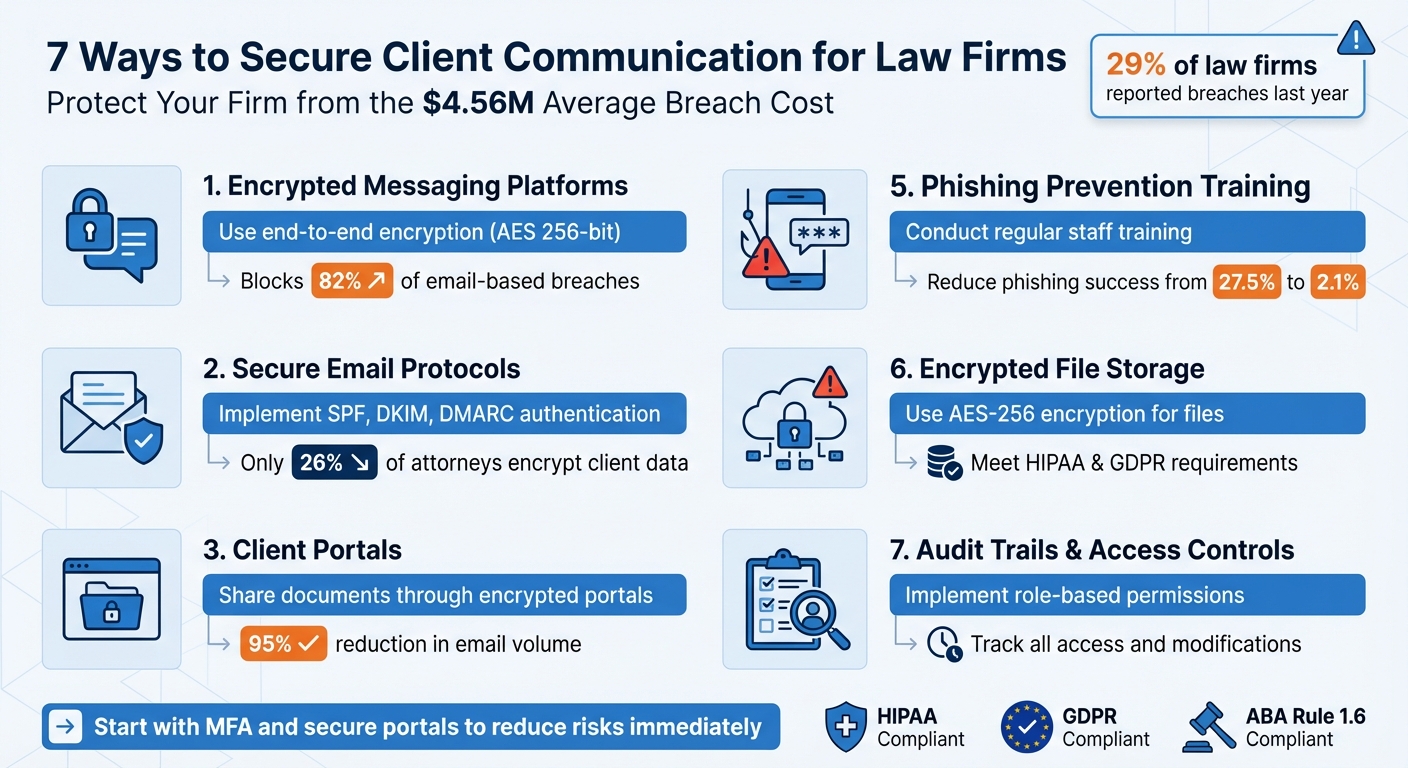
7 Essential Security Strategies for Law Firm Client Communication
Why Your Law Firm is a Prime Cyber Target (And How to Protect It)
sbb-itb-804866a
1. Use End-to-End Encrypted Messaging Platforms like Eleidon
Email might feel convenient, but it’s risky - 82% of breaches in legal services involve compromised email systems. Take the Henderson v. Henderson case, for example, where unencrypted communications led to breaches costing millions.
How Encryption Protects Your Communications
End-to-end encrypted (E2EE) platforms like Eleidon provide a safer alternative by encrypting messages directly on your device before they’re sent. The data stays encrypted until it reaches the recipient’s device, meaning even the service provider can’t access the content.
Eleidon uses AES 256-bit encryption, a federal standard for secure communication, paired with zero-knowledge architecture. This means that even if their servers are hacked, your messages remain unreadable. The platform also includes sender verification to combat impersonation attacks - an essential feature, especially after the Wellington Family Trust v. Pierce & Associates case, where hackers impersonated a senior partner and caused $18.3 million in fraudulent transfers. This level of security not only protects sensitive data but also supports compliance with strict legal regulations.
Meeting Legal and Ethical Standards (HIPAA, GDPR)
Law firms dealing with Protected Health Information (PHI) or international clients must comply with regulations like HIPAA and GDPR. Eleidon’s zero-knowledge architecture ensures that even they can’t access your data, aligning with these requirements. This also meets ethical obligations outlined in ABA Model Rules 1.6 and 1.1. Eleidon’s built-in GDPR compliance makes it easier to manage international cases without worrying about violating cross-border data transfer laws.
The cost? Eleidon starts at $9 per user per month for the Team plan or $14 per user per month for the Team + Vault plan. When compared to the $4.7 million average cost of a legal services data breach in 2024, it’s a small price to pay for peace of mind.
Seamless Integration into Your Workflow
Security shouldn’t come at the expense of efficiency. Eleidon integrates smoothly into your law firm’s daily operations, offering features like one-click decryption and automated encryption rules. Administrators can set policies to encrypt messages automatically, taking the pressure off individual attorneys.
Eleidon works across web, mobile, and desktop with multi-device sync, so your team won’t have to change their usual workflows. Its trust request system ensures only approved contacts can message you, cutting down on phishing risks. Plus, it integrates easily with practice management software, adding a secure communication layer without requiring a complete system overhaul.
2. Set Up Secure Email Protocols with Encryption
For law firms, securing email communication is a must-have in today's digital landscape. Email remains a cornerstone for legal correspondence, but it’s also a prime target for cyberattacks. Shockingly, only 26% of attorneys encrypt sensitive client data, a drop from 35% in previous years. A stark reminder of the risks comes from the 2024 Henderson v. Henderson case, where unencrypted financial affidavits were intercepted, leading to $2.3 million in fraudulent transfers and a $4.6 million judgment against the firm. While secure messaging apps provide some protection, securing email is equally critical to safeguard sensitive client information.
Encryption and Data Security Standards
Effective email security starts with encryption. AES 256-bit encryption, applied through TLS for server channels or S/MIME for message content, helps protect transmitted data. For the highest level of security, end-to-end encryption ensures that only the intended recipient can access the message.
Equally important are email authentication protocols like SPF, DKIM, and DMARC, which prevent spoofing and impersonation. In 2024, the Wellington Family Trust v. Pierce & Associates case highlighted the consequences of neglecting these measures. Attackers exploited the lack of authentication to request fraudulent wire transfers, resulting in $18.3 million in losses.
Compliance with Legal Regulations (e.g., GDPR, HIPAA)
Encryption isn’t just about security - it’s also about meeting legal obligations. For firms handling sensitive health information or international client data, encryption helps align with regulations like HIPAA and GDPR.
"Harleysville has conceded that its actions were the cyber world equivalent of leaving its claims file on a bench in the public square and telling its counsel where they could find it." – Judge Pamela Meade Sargent, U.S. District Court
Advanced encryption platforms go beyond just securing emails. They provide audit trails and reporting tools, which are essential during breach investigations or eDiscovery. Features like message expiration dates, recall options, and "do not forward" rules ensure that sensitive data doesn’t linger on third-party servers indefinitely.
Ease of Integration with Law Firm Workflows
Encryption tools need to fit seamlessly into your firm’s existing processes. Modern solutions often offer one-click decryption and integrate directly with platforms like Microsoft 365 or Gmail. Automated server-side encryption can even detect and secure sensitive information based on keywords or Data Loss Prevention (DLP) rules.
For added security, disabling POP/IMAP protocols can stop unauthorized devices from syncing emails. If syncing is necessary, multi-factor authentication (MFA) using hardware keys like YubiKey provides stronger protection than SMS-based codes.
User Accessibility and Training Resources
Even the best encryption tools are useless if employees don’t use them correctly. With 95% of data breaches in 2024 tied to human error, regular cybersecurity training is non-negotiable. Training sessions held at least twice a year, focusing on phishing and legal-specific scams, can significantly reduce risks. For example, firms that conducted monthly security training saw phishing success rates drop from 27.5% to just 2.1% in one year.
It’s also important to educate clients about your firm’s secure communication practices. Setting clear expectations can ease the process of receiving encrypted emails. Additionally, automating encryption based on keywords or recipient types can reduce the chances of human oversight, making email security a seamless part of your workflow.
3. Use Client Portals for Document Sharing
Secure client portals are a powerful addition to advanced email encryption and messaging practices, offering a safer way to share documents. Email attachments can expose sensitive information to unauthorized access or unintended distribution. By switching to secure portals, organizations have reported a 95% drop in email volume and 81% fewer client drop-offs. These portals provide features like access revocation, interaction tracking, and better control over sensitive materials.
Encryption and Data Security Standards
A solid client portal should use AES-256 encryption for data at rest and TLS 1.3 for data in transit. To further protect communications, Perfect Forward Secrecy ensures past exchanges remain secure even if encryption keys are compromised. Multi-factor authentication (MFA) - using authenticator apps or hardware tokens - adds another layer of security. Additionally, session timeouts of 15 to 30 minutes help prevent unauthorized access to idle accounts.
Compliance with Legal Regulations (e.g., GDPR, HIPAA)
Client portals are instrumental in helping law firms meet strict regulatory requirements. With role-based access control (RBAC), access to documents is limited to necessary users only. They also include immutable audit trails that log every action - login, file access, downloads, and modifications - complete with timestamps and IP addresses, meeting GDPR Article 30 standards. For firms managing healthcare data or serving global clients, portals can store data in specific geographic regions and automatically handle file retention or deletion based on compliance rules. Regulatory violations can lead to heavy penalties, making these compliance features indispensable.
Ease of Integration with Law Firm Workflows
Modern client portals integrate smoothly with popular practice management tools like Clio and MyCase through APIs and webhooks. Features such as "Secure Send" allow staff to work within familiar platforms like Microsoft Outlook while syncing files directly to the secure portal. This reduces the learning curve and encourages team-wide adoption. Law firms have reported up to an 80% increase in efficiency after integrating secure portals with their case management systems.
User Accessibility and Training Resources
Client portals must be user-friendly to ensure adoption. Features like magic links and mobile-ready apps make secure access simple and convenient. For external collaborators, such as expert witnesses, portals can provide view-only permissions with watermarking to prevent unauthorized sharing. Time-limited permissions that expire after specific milestones further enhance security. For instance, in September 2025, Adaptive Law Firm doubled its monthly case closure rates by replacing email attachments with a secure portal, offering controlled access to discovery materials for expert witnesses. Regularly reviewing permissions - ideally every quarter - ensures that former staff or inactive cases no longer have access to sensitive data.
Integrating secure portals into your workflow not only strengthens document security but also streamlines your overall communication processes.
4. Require Multi-Factor Authentication and Strong Passwords
Passwords alone no longer provide sufficient protection for law firms. In 2025, 36% of online accounts were compromised due to weak or stolen credentials, with cybercriminals leveraging AI to scale their attacks. Multi-factor authentication (MFA) adds a critical layer of security by requiring an additional verification step - like a code from your phone or a hardware security key. This extra step blocks 99.9% of credential-based breaches. Beyond bolstering security, MFA also ensures compliance with strict legal standards.
Compliance with Legal Regulations (e.g., GDPR, HIPAA)
MFA is a key component in safeguarding sensitive legal data. It helps attorneys fulfill their ethical obligations under ABA Model Rule 1.6, which mandates "reasonable efforts" to prevent unauthorized access to client information. Additionally, many cyber insurance policies now require MFA and Endpoint Detection and Response (EDR) software as prerequisites for coverage. Without these measures, law firms risk hefty regulatory fines and could face data breach costs averaging $4.56 million in professional services.
Ease of Integration with Law Firm Workflows
Integrating MFA into law firm operations is surprisingly straightforward. Many legal software platforms, including Microsoft 365, Google Workspace, Clio, and MyCase, already offer MFA as a built-in feature at no extra cost. Start by enabling MFA for partners and administrators, then expand firm-wide within 90 days. Pair MFA with a password manager to create and securely store unique passwords of 20+ characters. For context, a 12-character text-only password would take 4 million years to crack, while an 8-character complex password could be cracked in just 7 years. Using passphrases like "texasNetherlandsLondon" combines strength with memorability.
User Accessibility and Training Resources
For better security, use authentication apps like Microsoft Authenticator or Duo instead of SMS codes, which are more vulnerable to interception. For the highest level of protection, hardware tokens like YubiKey offer phishing-resistant authentication. During client onboarding, guide them through setting up MFA on secure portals to reduce reliance on insecure email communication. Perform quarterly access reviews to deactivate accounts belonging to former employees. Small firms often overlook these "legacy accounts", leaving them exposed to potential hackers. Since human error accounted for 95% of data breaches in 2024, continuous training is essential to reinforce the security measures you've implemented across your firm.
5. Train Staff and Clients on Phishing Prevention
Having strong encryption and access controls is essential, but they won't protect your firm if your team isn't prepared to spot and avoid phishing attempts. Human error is responsible for 74% of all data breaches, with phishing accounting for 36% of initial breaches in legal services. However, there's good news: firms that provide monthly security training have seen phishing success rates drop from 27.5% to just 2.1% within a year.
Compliance with Legal Regulations (e.g., GDPR, HIPAA)
Training your staff isn't just a good idea - it’s often a legal obligation. For example, ABA Model Rule 1.6 requires lawyers to "make reasonable efforts to prevent the unauthorized access or disclosure of client information". Family law practices are particularly vulnerable, experiencing a 47% higher rate of security incidents compared to other areas of law, largely due to the sensitive nature of divorce and custody cases. By prioritizing training, your firm can meet these legal requirements while better protecting your clients.
Ease of Integration with Law Firm Workflows
Regular training can easily complement your current security measures. Start with short, monthly learning sessions tailored to the legal industry. Focus on practical scenarios like identifying fake court documents, verifying wire transfer requests, or recognizing pretexting attempts by opposing parties. Add quarterly phishing simulations to reinforce these lessons. If someone clicks a simulated phishing link, use it as a learning moment to improve awareness.
Encourage a "When in Doubt, Shout" culture where employees feel safe reporting suspicious emails without fear of judgment. For example, in early 2025, the law firm of Loyd J. Bourgeois successfully stopped a breach after an employee's email was compromised. Thanks to their training, the team used their secure Case Status platform instead of email to notify clients within 120 seconds to ignore malicious messages. As Bourgeois explained:
"The ability to cut off a bad actor proactively and within 120 seconds was absolutely an amazing experience!"
User Accessibility and Training Resources
Don’t forget about your clients. During their first meeting, take time to guide them through your secure portal and show them how to create strong passwords. Many clients are unaware that their online habits could expose sensitive information, but the legal responsibility for such breaches often falls on your firm. Train staff to confirm unusual requests - if a partner emails about an urgent wire transfer, verify by calling them directly at a known number.
The return on investment for security awareness training in law firms averages 542%, factoring in prevented breaches and lower insurance premiums. Solo practitioners can expect to spend between $2,000 and $3,600 annually - far less than the $4.56 million average cost of a breach. Consistent training not only reduces risk but also strengthens your firm's ability to respond quickly to threats, making it a critical part of your overall security plan.
6. Use Encrypted File Storage and Sharing
Email attachments can leave sensitive files vulnerable once they're sent. To protect client data, law firms should use dedicated encrypted file storage and sharing tools that safeguard information throughout the entire process.
Encryption and Data Security Standards
Look for file storage solutions that offer AES-256 encryption for data at rest and TLS 1.2 or higher for data in transit. These measures help prevent unauthorized access and work alongside secure messaging and encrypted email protocols. It's also important to choose vendors with SOC2 and ISO 27001 certifications. End-to-end encryption ensures files remain protected from the moment they leave your system until they reach their recipient.
Additional features like multi-factor authentication, audit trails, document watermarking, and expiration dates on shared links give you more control. For instance, in October 2025, Gogo Mediation cut case filing times by 60% by using secure portals with automated workflows. This allowed clients to submit evidence without the risks tied to email attachments.
Compliance with Legal Regulations (e.g., GDPR, HIPAA)
Encrypted storage doesn’t just provide security - it helps law firms meet regulatory requirements. The ABA Model Rule 1.6 obligates lawyers to "make reasonable efforts to prevent the inadvertent or unauthorized disclosure of, or unauthorized access to, information relating to the representation of a client". Secure platforms with immutable audit trails log every action - like logins, downloads, and uploads - providing a clear chain of custody for regulatory audits.
Granular access controls, which limit file visibility to specific users or roles, align with the Principle of Least Privilege required under HIPAA and GDPR. Automated retention and disposal schedules can also help meet GDPR’s right to erasure. Considering that the average cost of a data breach for professional services firms is $4.56 million, investing in compliance-focused tools is a smart move.
Ease of Integration with Law Firm Workflows
To ensure smooth adoption, security tools should integrate with your existing systems, such as Outlook, Office 365, or iManage. Some platforms even include smart indexing and automated encryption settings that activate based on specific regulations. For example, in October 2025, Falconi Consulting improved project turnaround by 40% by shifting due diligence and multi-party approvals from email to encrypted workflows. Choosing tools that naturally fit into your current processes minimizes disruption and complexity.
User Accessibility and Training Resources
For secure file-sharing tools to be effective, both your team and clients need to find them easy to use. Many attorneys may not be familiar with these tools, so it’s helpful to introduce them during client onboarding. Features such as password-protected links and automatic expiration dates add extra layers of security, while options to remotely wipe data from lost or compromised devices help maintain control.
Since user error is a leading cause of security breaches, simplicity and accessibility are critical for adoption. By integrating encrypted storage with your other secure communication tools, you can create a more comprehensive and user-friendly data protection strategy.
7. Keep Audit Trails and Access Controls
To strengthen your firm's data protection, it's essential to go beyond secure messaging and storage by implementing robust audit trails and access controls. These measures not only safeguard sensitive information but also help meet legal requirements.
Compliance with Legal Regulations (e.g., GDPR, HIPAA)
Role-based access control ensures that employees only access the information they need. For instance, a paralegal working on estate planning shouldn’t have access to criminal defense files. Comprehensive audit logs - tracking details like IP addresses, login times, and file changes - help meet regulations such as HIPAA, GDPR, and the SHIELD Act. These practices minimize risks of financial and reputational harm.
The consequences of neglecting these controls can be severe. In April 2024, Pierce & Associates faced a phishing attack resulting in $18.3 million in fraudulent transfers. Their insurance only covered $5 million, leaving the partners personally liable for $13.3 million. Regular quarterly reviews of access permissions can help prevent such incidents, ensuring that former employees or third-party vendors no longer have access to sensitive systems.
Ease of Integration with Law Firm Workflows
Modern tools make implementing these controls seamless. For example, Microsoft Purview (priced at $15 per user monthly) automatically classifies documents and enforces access rules. Meanwhile, practice management software logs user activity and flags unusual login attempts.
Conditional access policies add another layer of security by requiring advanced authentication methods, such as biometric scans or hardware keys like YubiKey, for accessing confidential documents. Additionally, firms using managed detection services have reduced their breach detection time from an average of 197 days to just 23 days - a critical improvement in mitigating potential damage.
User Accessibility and Training Resources
Even the best controls fail without proper usage. Human error is a leading cause of breaches, so tools like multi-factor authentication and endpoint protection are essential for strong security without disrupting daily workflows. Training programs that explain how and why these measures work are equally important.
In 2023–2024, 29% of law firms reported security breaches, with the average cost for professional services firms reaching $4.56 million. Regular training sessions and user-friendly security tools can help ensure your firm avoids becoming part of that statistic. Clearly documented access policies also make it easier for staff and clients to follow security protocols during onboarding, fostering a safer working environment.
Conclusion
Protecting client communication isn’t just good practice - it’s a professional obligation. According to ABA Rule 1.6, attorneys must make "reasonable efforts" to prevent unauthorized access to client information. Yet, many lawyers still rely on outdated security measures, leaving sensitive data vulnerable. The consequences? Multimillion-dollar breaches, malpractice claims, ethical sanctions, and, perhaps most damaging, a loss of client trust.
The seven strategies outlined here provide a robust defense against modern threats like AI-driven attacks, phishing schemes, and human error. They also ensure compliance with critical regulations such as HIPAA, GDPR, CCPA, and the NY SHIELD Act. Beyond safeguarding data, these measures reinforce your firm’s ethical standing and operational efficiency. In fact, firms that excel in client experience often see revenue gains of 4% to 8% beyond their market peers. By integrating these strategies into your practice, you not only meet legal requirements but also position your firm to thrive in an increasingly digital landscape.
Start with the basics: enforce strong passwords and multi-factor authentication across all accounts. Next, upgrade from traditional email to a secure client portal for document sharing. This step alone reduces ethical risks, centralizes access control, and improves communication - a critical factor, considering 82% of clients have left law firms due to poor communication. With global spending on security and risk management expected to hit $240 billion by 2026, it’s clear that investing in prevention now is far more cost-effective than dealing with the aftermath of a breach.
FAQs
What should we secure first?
The first step in protecting sensitive information is securing the channels used for client communication. Start with encrypted email and messaging platforms. These tools add a critical layer of protection, making it much harder for unauthorized parties to access private conversations.
By using encryption, you’re not only safeguarding confidentiality but also meeting important legal industry standards.
When is email encryption not enough?
Email encryption, while important, isn't always enough to tackle risks like hacking, phishing, or unauthorized access. If the encryption methods are outdated or poorly set up, they can leave gaps in your security. For true protection, compliance often demands multi-layered security measures. This can include tools like multi-factor authentication and secure communication platforms to handle vulnerabilities such as weak passwords and ever-changing threats.
How do we onboard clients to secure tools?
To bring clients on board securely, law firms should stick to a well-organized approach:
- Educate clients: Start by explaining secure communication methods and highlighting potential risks.
- Use secure platforms: Recommend tools like encrypted messaging apps or email services to protect sensitive information.
- Provide clear guidance: Offer step-by-step instructions to help clients access and use these tools effectively.
- Confirm understanding: Ensure clients grasp the process by using tutorials or asking for confirmation.
- Practice ongoing security: Encourage habits like avoiding public Wi-Fi and creating strong passwords to maintain protection over time.
This structured process helps safeguard both the firm and its clients from potential security threats.