

How to Write Secure Communication Policies
Secure communication policies are essential for protecting sensitive data, ensuring compliance, and minimizing risks in external interactions. They guide employees on safe communication practices, from choosing secure channels to handling sensitive information responsibly. Without clear policies, organizations face increased risks from phishing attacks, regulatory fines, and data breaches.
Key Takeaways:
- Why They Matter: Prevent data breaches, comply with regulations (e.g., HIPAA, GDPR), and reduce human errors, which account for 88% of breaches.
- Preparation Steps: Identify all communication channels, assess risks, and classify sensitive information into Public, Internal, Confidential, and Restricted categories.
- Core Elements: Define roles (e.g., CISO, IT admins), implement safeguards (e.g., encryption, MFA, DMARC), and establish behavioral standards (e.g., verify unusual requests, report phishing attempts).
- Implementation: Pilot the policy, educate employees on its importance, and use tools like Data Loss Prevention (DLP) systems for enforcement.
- Secure Messaging: Platforms like Eleidon enhance security with cryptographic sender verification and end-to-end encryption.
A well-crafted policy combines clear guidelines, technical safeguards, and secure tools to protect your organization’s communication.
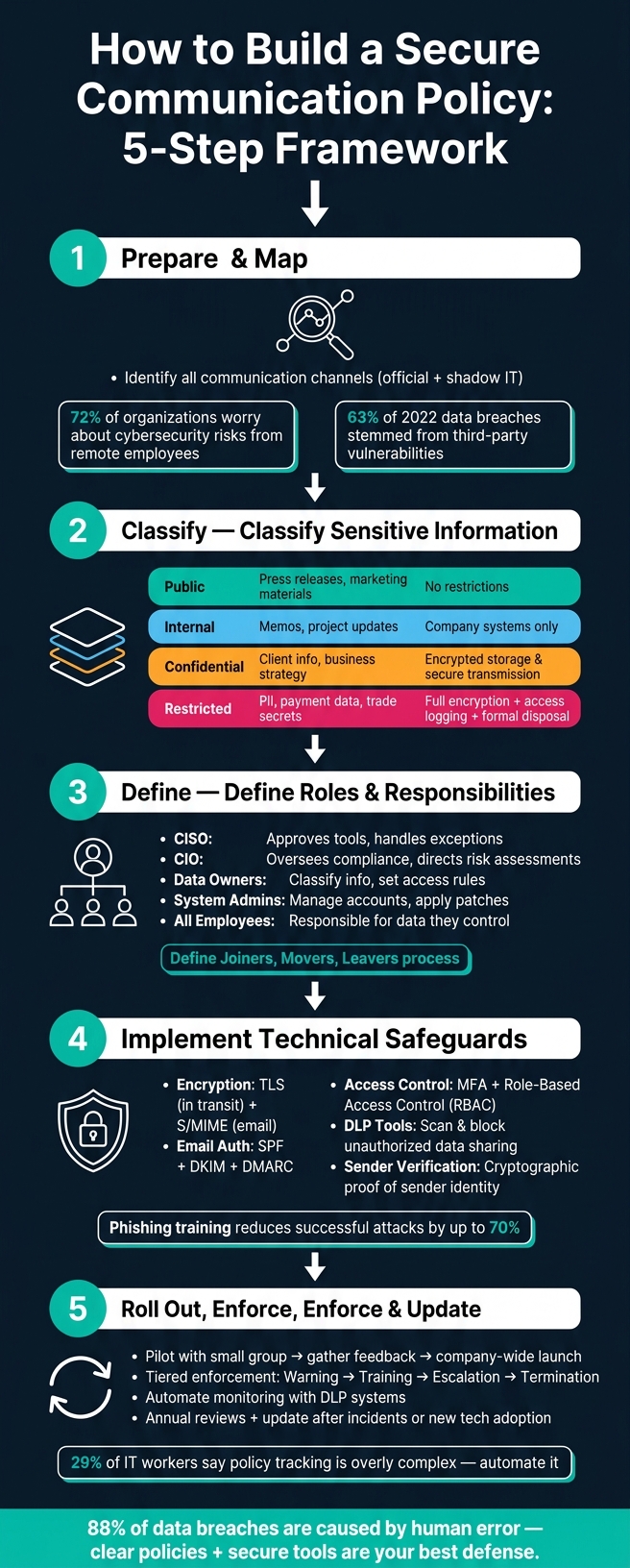
How to Build a Secure Communication Policy: 5-Step Framework
How to write an Information Security Policy inline with ISO 27001
sbb-itb-804866a
How to Prepare Before Writing a Secure Communication Policy
Before drafting your policy, it’s essential to understand how your organization communicates. Skipping this step can result in vague, unenforceable policies. This preparation phase helps you gather the necessary information to create a policy that is clear, practical, and effective.
Mapping Communication Channels and Their Risks
Start by listing all external communication platforms your team uses - both official tools and unsanctioned ones like personal WhatsApp accounts. Shadow communication is a growing concern, especially in hybrid work environments, with 72% of organizations expressing serious worries about cybersecurity risks tied to remote employees.
Once you’ve identified all communication channels, evaluate the risks associated with each. Consider questions like: Is the platform prone to phishing attacks? Does it encrypt data during transmission? What happens to access when an employee leaves? Since 63% of data breaches in 2022 stemmed from third-party vulnerabilities, it’s critical to assess the security measures of external vendors and cloud services your team relies on. Additionally, link each channel to its specific purpose - whether it’s used for client approvals, financial discussions, or internal planning - and analyze its security risk.
This detailed inventory and risk assessment will help you classify sensitive information effectively.
How to Classify Sensitive Information
A straightforward way to organize sensitive information is by using a four-tier classification system: Public, Internal, Confidential, and Restricted. This simple structure makes it easier for employees to understand and follow.
"Classification is only useful if people know what to do with it. Each level needs clear guidance on access, storage, transmission, and disposal." - Voss Intelligence
Tie each classification level to the regulatory standards your industry must follow. For instance, healthcare organizations must comply with HIPAA, which mandates retaining health-related data for at least six years. Financial firms, on the other hand, must adhere to standards like PCI DSS and SOX. Once the categories are defined, outline specific handling rules for each. For example, Restricted data - such as PII or payment details - should require encryption, access logging, and formal disposal procedures. In contrast, Internal data may only need to stay within company systems.
| Classification Level | Example Data | Key Handling Rule |
|---|---|---|
| Public | Press releases, marketing materials | No restrictions; shareable freely |
| Internal | Internal memos, project updates | Stored on company systems only |
| Confidential | Client information, business strategy | Encrypted storage and secure transmission required |
| Restricted | PII, payment data, trade secrets | Full encryption, access logging, formal disposal |
With these classifications in place, you can tailor security measures to each communication channel.
Who to Involve in Policy Development
To create a well-rounded policy, involve representatives from IT, legal, compliance, and key departments like finance, HR, and customer support. Your core team should include:
- IT and system administrators: They understand what’s technically feasible.
- Legal counsel: They define data retention rules and liability boundaries.
- Compliance and risk officers: They ensure the policy aligns with regulatory requirements.
- Department leaders: They provide insights into workflows and potential bottlenecks.
As noted in Microsoft Purview’s documentation:
"Admins should immediately assign custom reviewers to this policy as appropriate for your organization. This assignment might include reviewers such as your Compliance Officer, Risk Officer, or members of your Human Resources department."
The end goal is a policy that is enforceable by security teams and practical for employees. Without input from business leaders, there’s a risk of creating rules that look good on paper but are so cumbersome that employees might bypass them altogether.
Key Elements of a Secure Communication Policy
Once your communication channels are identified and stakeholders are on the same page, the next step is crafting a solid policy. A secure communication policy rests on three key pillars: clear accountability, technical controls, and behavioral standards.
Defining Roles and Responsibilities
Every role in your organization interacts with communication security differently, so assigning clear, written responsibilities is essential. Here's how it typically breaks down:
- CISO (Chief Information Security Officer): Approves security tools and handles exceptions.
- CIO (Chief Information Officer): Oversees compliance and directs risk assessments.
- Data Owners or Department Heads: Classify information and set access rules within their domains.
- System Administrators: Manage user accounts, apply patches, and ensure platforms meet security standards.
But it doesn't stop there - every individual in the organization has a role to play. UC Berkeley's security policy captures this well:
"A fundamental principle of information security... is that all individuals in the university community have a responsibility for the security and protection of university Institutional Information and IT Resources over which they have control."
One often-overlooked but critical detail is defining a "Joiners, Movers, Leavers" process. Your policy should establish clear workflows for administrators to revoke access as soon as someone changes roles or leaves the organization. Leaving outdated access permissions intact is one of the most common and avoidable security vulnerabilities.
These defined roles set the stage for implementing effective technical safeguards.
Technical Safeguards to Include in Your Policy
Once roles are clear, technical safeguards provide the backbone of your security measures. Your policy should outline specific controls, as encryption alone is just the starting point. For example:
- Encryption: Use TLS for securing data in transit and S/MIME for end-to-end email encryption. S/MIME is often preferred over PGP in business settings due to its centralized management capabilities, including credential revocation when employees leave.
- Email Authentication: Implement SPF, DKIM, and DMARC to prevent domain spoofing. Start with a DMARC "softfail" policy and move to "quarantine" or "reject" once the setup is verified. Google mandates DMARC authentication for domains sending over 5,000 emails daily.
- Access Controls: Require multi-factor authentication (MFA) for platforms handling sensitive data. Use role-based access control (RBAC) to ensure employees only access what they need.
- Data Loss Prevention (DLP): Deploy tools that scan and block unauthorized sharing of sensitive data.
For external communications, consider cryptographic sender verification tools like Eleidon to confirm a sender's identity before messages reach recipients.
Behavioral Standards for Communicating Securely
Even with strong technical controls, human behavior often remains the weakest link. That's why clearly defined behavioral standards are essential.
Your policy should encourage employees to:
- Verify Unusual Requests: For example, confirm wire transfer or credential change requests through a secondary channel like a phone call.
- Avoid Risky Practices: Prohibit auto-forwarding company emails to personal accounts and require the use of BCC for large group emails to protect contact information.
- Report Suspicious Activity: Simplify the process for reporting phishing attempts or suspicious emails. For instance:
"If an email feels off, don't just delete it. Forward it to security@yourcompany.com, and our team will investigate immediately."
– Typewire
Phishing awareness training can significantly reduce successful attacks - by as much as 70%. This highlights the importance of combining clear behavioral standards with technical safeguards to create a well-rounded communication security policy.
How to Roll Out and Enforce Your Policy
With a solid policy in place, the real challenge lies in putting it into action and ensuring it’s followed consistently.
Steps for Rolling Out the Policy
Once your policy is ready, the way you introduce it can make or break its success. Start by piloting the policy with a smaller group. This allows you to identify any issues that might not have been obvious on paper. As InventiveHQ wisely points out, "Policies that are unreasonably strict get ignored or worked around." Use feedback from the pilot phase to fine-tune the policy before launching it across the entire organization.
When rolling it out company-wide, focus on explaining why each rule exists rather than simply stating the rules. Employees are more likely to follow guidelines when they understand their purpose. For instance, if you explain that multi-factor authentication helps protect against credential theft, it feels less like a burden and more like a necessary safeguard.
Offer ongoing training that’s engaging and relevant - think short videos, real-world scenarios, and examples tailored to specific roles. Update onboarding processes and communication templates so that new employees are introduced to the policy from day one. This way, compliance becomes part of the company culture right from the start.
Enforcement and Compliance Monitoring
Consistency is key when it comes to enforcement. A tiered approach works best. First-time violations might lead to additional training and a formal warning. Repeated violations could escalate to termination. What’s crucial is applying these standards equally, no matter someone’s role or rank.
"Nothing undermines a policy faster than uneven enforcement. When executives bypass security controls without consequences, employees notice." - Voss Intelligence
For monitoring, automation can be a game-changer. Tools like Data Loss Prevention (DLP) systems can scan outgoing communications for sensitive information - such as Social Security numbers or credit card details - and either encrypt the data automatically or alert the sender. Tracking metrics like phishing reports or adoption rates for secure tools can help pinpoint where compliance might be slipping. Interestingly, 29% of IT workers report that policy tracking and enforcement are overly complex and time-consuming. Automation can ease this burden and help ensure consistent adherence.
Keeping the Policy Up to Date
Policies aren’t static - they need to evolve as new threats emerge, regulations change, and your organization grows. Schedule annual reviews to assess the policy’s relevance, and update it immediately after major incidents, organizational shifts, or the adoption of new technologies. Keep a record of every revision to maintain a clear audit trail.
Regulators are increasingly focused on areas like AI-driven messaging and off-channel communications. For example, employees using personal apps like WhatsApp for work conversations can create compliance risks if those messages aren’t part of your official records.
"Treat communication security as an evolving practice to build lasting resilience." - PulseOne
Assign a specific person or team to manage the review process. Without clear ownership, updates can easily fall by the wayside, leaving your policy outdated and ineffective.
Using Secure Messaging Platforms Like Eleidon
When policies alone can't address every gap, a secure messaging tool becomes essential. Selecting the right platform is just as critical as the rules that govern its use.
What to Look for in a Secure Messaging Platform
Secure messaging tools come with a wide range of features, but a few stand out as must-haves for external communication.
- End-to-end encryption: This ensures that messages are readable only by the sender and recipient, keeping them safe from interception - even by the service provider.
- Cryptographic sender verification: This goes beyond basic email protocols to confirm the true origin of a message, offering a layer of trust that standard methods can't match.
- Approved-contact controls: By allowing messages only from vetted contacts, these controls significantly reduce phishing risks.
- GDPR compliance: For organizations dealing with EU residents' data, adhering to these regulations is non-negotiable.
The importance of these features is underscored by statistics like this: 25% of fraud cases in the U.S. start with an email. Limiting who can initiate contact is a key defense.
These criteria provide a framework for understanding how Eleidon stands out in securing external communication.
How Eleidon Supports Secure External Communication
Eleidon operates on the principle that trust in communication should be based on cryptographic proof, not assumptions. Using Ed25519 digital signatures, it verifies the specific sender behind each message - not just the domain or server. This process ensures sensitive cryptographic keys never leave the sender's environment, as all signing happens locally.
Messages are normalized (e.g., From, To, Subject, Timestamp, Body-Hash) before signing, so any tampering during transit is immediately flagged as a verification failure. Recipients can authenticate messages via a public API endpoint, which provides a clear confidence score:
| Verification Result | Confidence | Meaning |
|---|---|---|
| Verified | 1.0 | Valid signature from an agent with a verified inbox |
| Verified | 0.7 | Valid signature, but inbox ownership is not yet confirmed |
| Unknown | 0.0 | No registered agent found for this sender |
| Fraudulent | 1.0 | Invalid signature, sender mismatch, or malformed header |
This system is especially valuable in high-stakes industries like healthcare, legal, and finance. For example, in financial services, an AI agent can be programmed to act only on instructions with a verified confidence score of 1.0, effectively eliminating a major attack vector.
How to Incorporate Eleidon into Your Communication Policy
To make the most of Eleidon, align its features with your secure communication policy. Specify its use for sensitive data types - such as protected health information, financial transactions, or client contracts - that require verified, encrypted channels instead of standard email.
"Security works best when it's built into the workflow, not added as friction afterward." - PulseOne
For access control, integrate Eleidon with your organization's Active Directory. This ensures that if an employee leaves or a device is lost, access can be revoked immediately. Regular audits of access logs and retention settings can help maintain compliance with regulations like GDPR, HIPAA, or financial standards.
Eleidon also offers a cost-effective way to get started: signing is free, and verification begins at $0/month for up to 100 checks. This makes it easy to pilot the system before committing to a full rollout. By incorporating Eleidon into your policy, you can seamlessly enforce secure communication standards across all external interactions.
Conclusion: Building a Policy That Keeps External Communication Secure
Creating a secure communication policy isn't just about ticking boxes - it's about crafting a system that brings together people, processes, and technology to tackle ever-changing threats. The risks of weak or incomplete measures are too great to ignore.
Effective policies require collaboration across departments like IT, legal, HR, and operations. They should clearly outline roles, define approved communication channels, and combine behavioral guidelines with technical safeguards to protect sensitive data. However, even the best policy needs strong technology to back it up.
"When VoIP and communication security is treated as a living practice, not a one-time project, organizations gain resilience that extends beyond technology." - PulseOne
In reality, enforcing a policy depends heavily on secure tools. Platforms like Eleidon turn policy goals into actionable safeguards. Eleidon ensures that external messaging is limited to verified contacts and uses cryptographic proof to address vulnerabilities that policies alone can't fix. This is especially critical in industries like healthcare, legal, and finance, where the stakes are incredibly high.
The key is to establish a process that's consistent and adaptable. Policies should grow alongside your organization and respond to new threats as they emerge. Start with your current understanding, involve the right stakeholders, and build a system that evolves over time.
FAQs
What’s the first step in writing a secure communication policy?
To get started, create clear, straightforward guidelines that outline which platforms are approved for both internal and external communication. Set boundaries for handling sensitive topics and craft rules that employees can easily understand and apply. This approach makes the policy practical and simple to follow right from the beginning.
How do we decide what data counts as Public, Internal, Confidential, or Restricted?
Data classification is all about understanding how sensitive different types of information are and what could happen if they were exposed. Here's a breakdown of common categories:
- Public Data: This is information that's safe to share with the world. Think of things like press releases or marketing materials. Even if someone outside your organization sees it, there's no harm.
- Internal Data: This type is meant to stay within the organization. It could include internal policies, employee handbooks, or internal memos. While not highly sensitive, it’s not intended for public eyes.
- Confidential Data: Now we’re getting into more sensitive territory. This includes things like personal health records, customer data, or financial information. Unauthorized access could lead to privacy violations or legal trouble, so it requires strict controls.
- Restricted Data: This is the most sensitive category, covering things like trade secrets, proprietary algorithms, or classified government documents. If this kind of data leaks, the consequences could be severe - financial losses, competitive disadvantages, or even national security risks.
When categorizing data, consider three main factors: how sensitive it is, the potential harm if it’s exposed, and any legal or regulatory requirements. This ensures the right level of protection is applied to keep the data secure.
How can we enforce secure external communication without slowing teams down?
To keep external communication secure while maintaining team productivity, it’s essential to establish clear and actionable policies. These should outline approved platforms and detail how to handle sensitive information properly. Rely on tools like end-to-end encrypted systems to prevent unauthorized access and lower the chances of phishing attacks. Regular training sessions and simplified processes can help embed security into everyday tasks, striking a balance between safeguarding data and ensuring efficiency.