
Checklist for Implementing Phishing-Resistant MFA
Phishing-resistant MFA is the future of secure authentication. It uses advanced methods like FIDO2/WebAuthn to protect against phishing attacks that bypass traditional MFA methods like SMS or push notifications. Here's why it matters and how to implement it:
- Why It’s Important: Phishing-resistant MFA blocks threats like Adversary-in-the-Middle (AiTM) attacks. For instance, Google reported zero phishing attacks after rolling out FIDO2 security keys to its employees. Regulatory mandates and cyber insurance policies are also pushing organizations to adopt this method.
- Key Steps: Start by identifying stakeholders, assessing risks, and ensuring your infrastructure supports FIDO2. Roll out in phases, prioritize high-risk users, and enforce strict policies to eliminate weaker methods like SMS or TOTP.
- What to Watch: Monitor adoption rates, fallback usage, and login anomalies. Regularly audit policies and recovery paths to maintain security.
This checklist is a practical roadmap to strengthen your organization’s defenses against phishing attacks while meeting compliance requirements. It focuses on preparation, technical setup, policy enforcement, and ongoing monitoring to ensure a smooth transition to phishing-resistant MFA.
Preparation and Prerequisites
Stakeholder Identification and Governance
Rolling out phishing-resistant MFA impacts all areas of an organization, so it’s essential to involve key stakeholders from the beginning. The CISO and IAM leads oversee architecture decisions, such as whether to use synced or device-bound passkeys and how to set a migration timeline. Meanwhile, IT and Security Operations focus on configuring identity providers like Microsoft Entra or Okta. On the compliance front, Legal and Compliance teams ensure the rollout meets regulatory frameworks like PCI DSS 4.0 and OMB M-22-09.
Two often-overlooked groups are HR and Help Desk. HR should embed MFA enrollment into both onboarding and offboarding workflows to ensure no accounts are missed. Help Desk teams, on the other hand, must design secure recovery processes. Weak recovery paths are a common way attackers bypass strong authentication.
| Stakeholder Group | Primary Responsibility |
|---|---|
| CISO / IAM Leads | Architecture design, policy enforcement, vendor selection |
| Compliance / Legal | Regulatory alignment (PCI DSS 4.0, OMB M-22-09) |
| HR / Lifecycle Teams | Integration into onboarding/offboarding workflows |
| Help Desk | Secure recovery, Temporary Access Pass (TAP) issuance |
| App Owners | Modernizing legacy apps or implementing access gateways |
| Security Ops | Monitoring for bypass attempts and incident response |
One critical governance decision is defining "break-glass" accounts - emergency access accounts excluded from standard MFA policies. These accounts act as a safety net, preventing total lockouts during deployment issues.
With stakeholders aligned, the next step is to assess risks and prioritize high-vulnerability areas.
Risk Assessment and Use Case Prioritization
Once the key players are on board, it’s time to evaluate existing vulnerabilities. Start by auditing current authentication methods to identify those prone to phishing. Use your identity provider’s registration reports - like the Authentication Methods Activity report in Microsoft Entra - to find users without MFA or those still relying on insecure methods like SMS and voice calls. Also, review sign-in logs to flag legacy authentication paths that may need special handling, as these often don’t support phishing-resistant methods.
Next, prioritize based on risk. Global Administrators, Application Administrators, Billing Administrators, and Help Desk Administrators are typically the highest-risk users. Finance teams and executives also rank high due to the sensitivity of their roles. As one industry expert notes:
"We have seen the questions shift to 'what authentication methods are permitted in your Conditional Access policies?' and that is where organisations get caught, because FIDO2 is likely on privileged accounts but push and SMS are still permitted everywhere else."
Don’t forget to identify "hard cases" early. These include shared workstations, warehouse kiosks, and legacy apps that don’t natively support WebAuthn. Addressing these scenarios often requires custom technical solutions, which can delay deployment if not tackled upfront.
Once risks are mapped, ensure your infrastructure is ready to support the rollout.
Technical and Infrastructure Requirements
With priorities set, confirm that your technical setup can handle phishing-resistant MFA. Start by reviewing your identity environment. Cloud-only configurations are the easiest to manage, whereas hybrid setups need tools like Microsoft Entra Connect to sync on-premises Active Directory with the cloud. For older on-premises apps, you might need solutions like an Application Proxy or a Network Policy Server (NPS) extension for RADIUS-based systems.
Next, evaluate endpoint and browser compatibility. For instance, Windows Hello for Business requires a TPM chip, while hardware keys like YubiKeys need USB-C or NFC support. Older devices or restrictive browser settings might block WebAuthn, so test compatibility across all devices and applications.
Finally, verify your licensing requirements. Enforcing phishing-resistant MFA in Microsoft environments requires at least an Entra ID P1 or Business Premium license.
For users in high-privilege roles, plan to issue two roaming hardware keys per person. This redundancy prevents reliance on insecure help desk resets if a key is lost, which could otherwise become an attack vector.
Technical Implementation Checklist
Choosing and Configuring Authenticators
When selecting authenticators, it's important to align them with user roles. For administrators and users in highly regulated roles, device-bound hardware keys like YubiKey are ideal. These credentials stay locked to the physical device, offering a higher level of security. For the general workforce, synced passkeys through platforms like iCloud Keychain or Google Password Manager provide a balance between security and ease of use. While synced passkeys are easier to recover and require less support, they trade off some rigidity compared to hardware keys.
All chosen methods must adhere to the FIDO2/WebAuthn protocol. This ensures the credential is tied to a specific domain (the Relying Party ID), effectively blocking relay attacks such as Adversary-in-the-Middle (AiTM) kits.
Immediately disable fallback methods like SMS, TOTP, and push notifications after registration to eliminate phishable vulnerabilities. As WorkOS security researcher Maria Paktiti explains:
"Phishing resistance is a property of the entire authentication chain, not a property of the strongest method in the chain."
For environments requiring the highest security standards, such as NIST AAL3 compliance, enforce attestation during enrollment. This process, supported by the FIDO Metadata Service (MDS), confirms the make and model of the hardware authenticator meet your security criteria before being trusted.
Once authenticators are configured, integrate them into your identity systems to ensure seamless use.
Identity Provider and Application Integration
Enable FIDO2 and passkey support in your identity provider to strengthen your MFA setup. For instance, in Microsoft Entra, you can configure "Phishing-Resistant MFA Strength" within Conditional Access policies. This setting ensures that only phishing-resistant methods are allowed, rejecting weaker options at the policy level. Note that enforcing this requires Entra ID P1 licensing, while P2 licensing adds advanced capabilities like risk-based triggers that escalate to phishing-resistant MFA during suspicious activities.
Start by running these policies in "Report-only" mode. This approach helps identify any integration gaps by reviewing sign-in logs to see which users or applications might be blocked, without disrupting access.
For custom or internal applications, developers must implement the WebAuthn API. It's critical to ensure the Relying Party (RP) ID matches the application's domain. Misconfigured RP IDs can break the cryptographic origin binding that underpins FIDO2's phishing resistance. Additionally, evaluate user automation and service accounts, transitioning them to workload identities to avoid conflicts with MFA enforcement.
| User Persona | Recommended Portable Credential | Recommended Local Credential |
|---|---|---|
| Admins / Highly Regulated | FIDO2 Security Keys | Windows Hello for Business / Platform SSO |
| Standard Users | Synced Passkeys | Windows Hello for Business / Synced Passkeys |
Device Lifecycle and Recovery Processes
Once credentials are integrated, establish strong onboarding and recovery processes to maintain secure access. Use a Temporary Access Pass (TAP) for onboarding, and for remote users, incorporate high-assurance identity proofing methods such as video verification, liveness detection, or verified ID documents.
The order of credential enrollment is crucial. Users should first register a portable credential (like a FIDO2 key or synced passkey). This credential can then be used to set up local credentials (e.g., Windows Hello for Business or macOS Platform SSO) on their primary devices.
To preserve MFA integrity during device transitions, require users to register at least two phishing-resistant methods, such as a hardware key and a platform passkey. For privileged accounts, eliminate self-service password reset (SSPR) options involving SMS. Instead, recovery should involve an admin-issued TAP or in-person identity verification. Finally, audit all recovery paths - such as "try another way" or "forgot password" options - to ensure none revert to SMS or email codes.
What is Phishing Resistant MFA and Why It Matters
sbb-itb-804866a
Policy and Rollout Plan
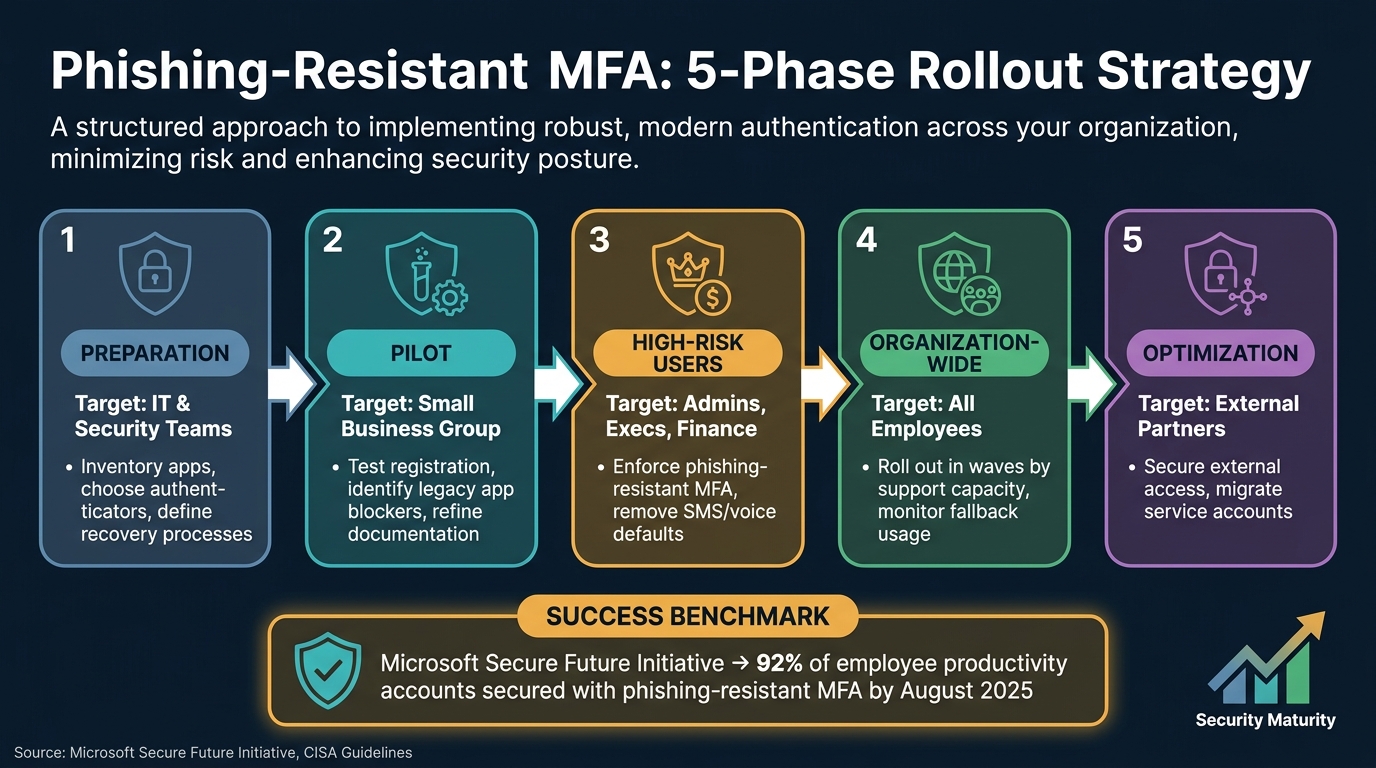
Phishing-Resistant MFA Implementation Roadmap: 5-Phase Rollout
Authentication Policies and Access Controls
To secure access, enforce only phishing-resistant authentication methods through Authentication Strength policies. In Microsoft Entra ID, this involves creating a Conditional Access policy that mandates FIDO2 or passkeys while explicitly rejecting SMS and push notifications. This approach ensures the policy handles the security, rather than relying on users to pick a safer method themselves.
Two critical areas often get overlooked. First, legacy authentication protocols like POP, IMAP, and Basic Auth must be explicitly blocked, as they can bypass MFA requirements entirely. Follow preparation guidelines for handling break-glass accounts, and migrate service accounts to workload identities. For high-risk roles such as administrators, finance teams, and executives, enforce stricter measures, like hardware-bound FIDO2 keys, shorter session lifetimes, and no self-service fallback options. For standard users, you can allow more flexibility - like synced passkeys with longer session durations - to balance usability with phishing resistance.
"Your password doesn't matter, but MFA does! Based on our studies, your account is more than 99.9% less likely to be compromised if you use MFA." - Alex Weinert, Director of Identity Security, Microsoft
Once these policies are in place, move forward with a structured, phased rollout to ensure a seamless transition.
Phased Rollout Strategy
An organization-wide switch all at once can overwhelm support teams and cause disruptions. Instead, adopt a phased approach to manage the rollout effectively and address early issues.
| Rollout Phase | Target Group | Key Actions |
|---|---|---|
| Phase 1: Preparation | IT & Security Teams | Inventory apps, choose authenticators, and define recovery processes |
| Phase 2: Pilot | Small Business Group | Test registration, identify blockers for legacy apps, and refine documentation |
| Phase 3: High-Risk | Admins, Execs, Finance | Enforce phishing-resistant MFA; remove SMS/voice as default options |
| Phase 4: Organization-Wide | All Employees | Roll out in waves based on support capacity; monitor fallback usage |
| Phase 5: Optimization | External Partners | Secure external access with phishing-resistant credentials; migrate service accounts |
Microsoft's rollout under its Secure Future Initiative offers a great example. By August 2025, they had protected 92% of employee productivity accounts with phishing-resistant authentication. This included using Temporary Access Passes for secure onboarding and aligning Conditional Access policies across affiliated tenants. Achieving this scale required a deliberate, phased strategy.
"Organizations should move to phishing-resistant authentication as quickly as possible." - CISA
While the technical rollout progresses, user education is key to ensuring adoption.
User Training and Communication
Even the best technical implementation can falter if users don't understand the changes. The goal is not to turn everyone into security experts but to provide enough context so they can act confidently.
Start with the "why" in simple terms. Explain that phishing-resistant MFA eliminates risks like accidentally approving fake login prompts. These credentials are cryptographically tied to the legitimate website - no codes to intercept, no prompts to approve blindly. Elastic's InfoSec team achieved rapid adoption globally by combining departmental tracking, office hours, and clear communication.
Address device loss and account recovery upfront, as this is often the top concern for users. Publish role-specific guides explaining what to do if a hardware key is lost or a device is replaced. For sensitive rollout communications - like distributing Temporary Access Passes or sending setup instructions - use secure, encrypted messaging channels. Tools like Eleidon are designed for these scenarios, offering cryptographic sender verification and end-to-end encryption. This ensures that instructions cannot be spoofed or intercepted, which is critical when these communications themselves could become phishing targets.
Using multiple communication channels works better than relying on a single email blast. On-demand videos are ideal for global or distributed teams, while live office hours provide real-time troubleshooting and help reduce support tickets. The format is less important than consistency - keep communicating throughout every phase of the rollout, not just at the start.
Monitoring and Continuous Improvement
Authentication Monitoring and Metrics
Keeping a close eye on your rollout's progress is crucial. One of the most telling indicators is the percentage of users adopting phishing-resistant authentication methods. For example, Microsoft’s Secure Future Initiative achieved 92% of employee productivity accounts secured with phishing-resistant authentication by August 2025. Regularly tracking this metric ensures you’re on the right path.
Another area to monitor is fallback usage - how often users resort to less secure methods, like SMS or push notifications, instead of FIDO2 or passkeys. High fallback rates can reveal vulnerabilities that attackers might exploit. Additionally, support ticket trends can provide valuable insights. A drop in MFA fatigue complaints or lockout issues often signals a smooth transition. Key metrics to track include:
| Metric Category | What to Track | What Success Looks Like |
|---|---|---|
| Adoption | % of users enrolled in FIDO2/Passkeys | 100% for admins; high overall coverage |
| Security | Frequency of fallback/bypass usage | Low and steadily decreasing |
| Operations | MFA-related support ticket volume | Decline in lockout and fatigue complaints |
| Compliance | Conditional Access enforcement coverage | 100% of sensitive apps protected |
| Threats | Failed MFA attempts and login anomalies | Early detection of suspicious activity |
Automating alerts for unusual activity - like repeated failed login attempts, new device registrations on dormant accounts, or logins from unfamiliar locations - can help you respond quickly to potential threats.
Incident Response and Recovery
When problems arise, such as a lost key, a compromised device, or signs of an account takeover, having a secure recovery process in place is critical. A common mistake is securing the primary authentication process while leaving recovery pathways exposed.
Your incident response plan should address specific attack scenarios, including Adversary-in-the-Middle (AiTM) proxies, MFA fatigue attacks, and ghost logins, where attackers exploit Single Sign-On (SSO) vulnerabilities to maintain access. For suspected compromises, revoke active session tokens immediately and invalidate any hardware-bound credentials. Adding out-of-band notifications - alerting users when MFA factors are added or removed - provides an additional safeguard against unauthorized changes.
For high-security recovery cases, such as remote employees replacing lost devices, consider video-based identity verification with liveness detection. Microsoft used this method during its Secure Future Initiative rollout to prevent fraudulent access during onboarding. When distributing recovery instructions or Temporary Access Passes, use encrypted communication channels. Tools like Eleidon offer cryptographic sender verification and end-to-end encryption, ensuring sensitive recovery messages remain secure.
Periodic Reviews and Updates
To maintain the integrity of your MFA setup over time, periodic reviews are essential. Configurations can drift as new apps are added or exceptions are made, so regular checks help ensure everything remains aligned with best practices.
Schedule monthly audits, quarterly log reviews, and bi-annual policy evaluations to stay compliant with CISA and NIST guidelines. Also, double-check that break-glass accounts and service account exceptions are still necessary and have appropriate controls in place.
"The mistake follows from over-claiming on the questionnaire and then not being able to produce the authentication methods registration report on the renewal call." - Ashish Srivastava, Head of Cyber Security & Strategy, TechBrain
When rolling out policy updates, use report-only mode in Conditional Access for 2–5 business days before enforcing changes. This allows you to identify users who might be blocked and address their issues without causing disruptions.
Conclusion
Phishing-resistant MFA is more than just a step forward - it's a fundamental shift in how organizations safeguard their most sensitive systems. With stolen credentials playing a role in 80% of hacking-related breaches, and advanced tools like Tycoon 2FA capable of bypassing traditional MFA almost instantly, the stakes couldn't be higher. Solutions like FIDO2 keys, passkeys, and enforcing strict Conditional Access policies tackle these challenges directly at the protocol level.
This checklist isn't just a set of guidelines; it's a 90-day roadmap to action. Start with an audit and pilot group, then prioritize high-risk users such as IT administrators and finance teams. Gradually expand the implementation while phasing out outdated methods like SMS and voice OTP. Skipping steps - like securing recovery paths or blocking downgrade options - can leave critical gaps in your defenses.
"The question is no longer whether an organization has MFA at all. The more useful question is whether the authentication flow can resist phishing, fake login pages, token theft, prompt fatigue, and weak recovery paths." - Cybersecurity Time
Adoption is also being driven by regulatory and insurance requirements. U.S. federal agencies, for instance, must now comply with Zero Trust mandates (OMB M-22-09) by implementing phishing-resistant MFA. Similarly, cyber insurers are increasingly linking premium costs to whether organizations have adopted these measures. For IT teams, following this roadmap not only strengthens security but also ensures compliance with these evolving demands.
Treat this checklist as a dynamic tool. Regularly update it to align with changes in your environment, applications, and threat landscape. The goal is to keep refining your authentication strategy to stay ahead of emerging threats.
FAQs
What makes MFA “phishing-resistant”?
Multi-factor authentication (MFA) is often labeled as phishing-resistant because it relies on cryptographic methods such as public-key cryptography and origin binding. These techniques ensure that authentication secrets remain secure and are never exposed to attackers. Additionally, credentials are designed to function exclusively on legitimate domains, effectively blocking relay and replay attacks. This method safeguards users from phishing attempts by verifying both the individual and the domain during the login process.
Do we need hardware security keys or are passkeys enough?
Passkeys, built on FIDO2 standards, offer a strong layer of phishing-resistant multi-factor authentication (MFA) when combined with device biometrics or PINs. They’re secure, easy to use, and compatible with most modern devices.
For roles requiring the highest security, such as those in regulated industries, hardware security keys like YubiKeys are often the best choice. However, for the majority of users, passkeys strike a great balance between security and convenience.
How do we handle lost devices without falling back to SMS?
When dealing with lost devices, it's crucial to prioritize secure recovery methods. Opt for cryptographic recovery techniques, such as backup hardware keys or alternative registered authenticators stored in a safe location. Steer clear of weaker options like SMS or knowledge-based questions, as they can be easily exploited.
Instead, focus on robust recovery processes, including:
- Cryptographic re-enrollment: Re-issuing secure credentials to the user.
- Identity verification: Confirming the user's identity through strong, reliable methods.
- Administrative attestation: Involving administrators to validate and approve the recovery.
Additionally, keep an updated inventory of all authenticators, enforce strict revocation policies for lost devices, and regularly test your recovery protocols. These steps help ensure your security measures remain effective and reliable.